How React Actually Works: Rendering, Effects, Refs and Custom Hooks
If you already write React but sometimes guess why a component re-rendered or why an effect fired twice, this post is for you. It is a short mental model for five connected ideas: rendering, lifecycle, useEffect, useRef and custom hooks.
Every snippet comes from a small Vite + React + TypeScript project with live demos (setup is at the end).
1. Rendering
A component is a function. Rendering means React calls it to get a description of the UI. Then React compares that to the previous result and updates only the DOM that changed.
A component re-renders when:
- Its state changes.
- Its parent renders (even if the props are identical).
- A context it reads changes.
Props changing is not a separate trigger. The parent had to render to pass new props.
Two consequences are worth remembering.
State is a snapshot. Inside one render, n never changes, no matter how many times you set it:
setN(n + 1);
setN(n + 1);
setN(n + 1); // n goes up by 1, not 3

setN((prev) => prev + 1);
setN((prev) => prev + 1);
setN((prev) => prev + 1); // n goes up by 3
Use the updater form whenever the next value depends on the previous one.
A parent render re-renders its children. memo opts a child out when its props are shallow-equal:
const MemoChild = memo(function MemoChild() {
  return <p>Rendered at {stamp()}</p>;
});
Type into an input in the parent and the plain child's timestamp changes on every keystroke. The memoized child's does not. Don't wrap everything in memo. Measure first, because most renders are cheap.
Render must be pure: same inputs, same output, no side effects. That is why side effects live in event handlers and effects.
2. Lifecycle (the hooks way)
Function components have no componentDidMount. Instead, think in three moments:
| Moment | How you express it |
|---|---|
| Mount | useEffect(() => { ... }, []) |
| Update | useEffect(() => { ... }, [dep]) |
| Unmount | the function returned from an effect (cleanup) |
function Child({ value, onLog }: { value: number; onLog: (m: string) => void }) {
  useEffect(() => {
    onLog("mounted");
    return () => onLog("unmounted (cleanup)");
  }, [onLog]);

  useEffect(() => {
    onLog(`effect ran, value = ${value}`);
  }, [value, onLog]);

  return <p>Prop value: {value}</p>;
}
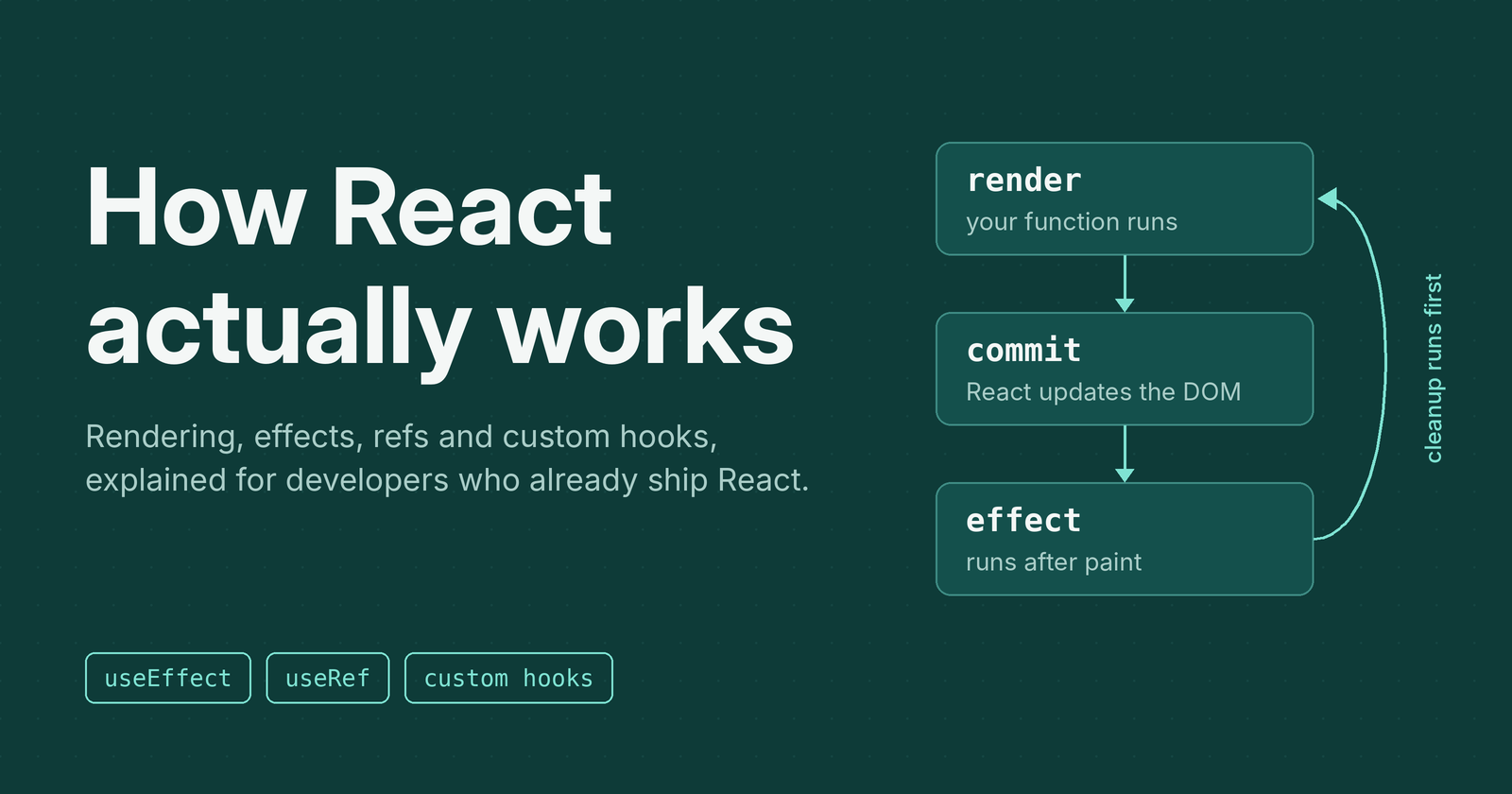
The order inside one component's life is:
- Render (your function runs)
- Commit (React updates the DOM)
- Effects run, after the browser paints
When dependencies change, React runs the previous effect's cleanup first, then the new effect.
Why does my effect run twice in dev?
<StrictMode> deliberately does mount → unmount → mount in development. If your effect breaks when that happens, it is missing a cleanup. It does not happen in production.
3. useEffect
An effect is for synchronizing with something outside React: the DOM, timers, subscriptions, the network.
useEffect(() => {
  const onResize = () => setWidth(window.innerWidth);
  window.addEventListener("resize", onResize);
  return () => window.removeEventListener("resize", onResize);
}, []);
The dependency array is not a performance knob. It lists every reactive value the effect reads, so React knows when to re-sync. Don't lie to it.
| Deps | Runs |
|---|---|
| none | after every render |
[] |
once after mount |
[a, b] |
after mount and whenever a or b changes |
You might not need an effect
If you can compute something during render, do that. This is a common mistake:
// Avoid: extra state + extra render
const [isLong, setIsLong] = useState(false);
useEffect(() => setIsLong(name.length > 10), [name]);

// Prefer
const isLong = name.length > 10;
Reach for an effect only when you are talking to the outside world.
4. useRef
useRef gives you a box, { current: ... }, that survives re-renders and does not cause one when changed. It has two main jobs.
Reach a DOM node:
const inputRef = useRef<HTMLInputElement>(null);

useEffect(() => {
  inputRef.current?.focus();
}, []);

return <input ref={inputRef} />;
Hold a value that must persist but isn't UI, like a timer id:
const intervalRef = useRef<number | null>(null);

function start() {
  if (intervalRef.current !== null) return;
  intervalRef.current = window.setInterval(() => setMs((m) => m + 100), 100);
}

function stop() {
  if (intervalRef.current === null) return;
  window.clearInterval(intervalRef.current);
  intervalRef.current = null;
}
A quick rule for choosing:
- Does the screen depend on it? Use state.
- Does it just need to stick around between renders? Use a ref.
Avoid reading or writing ref.current during render, except for one-time initialization. Do it in handlers and effects.
5. Custom hooks
A custom hook is a function whose name starts with use and which calls other hooks. It shares logic, not state: every component that calls it gets its own independent state.
useDebounce
export function useDebounce<T>(value: T, delay = 400): T {
  const [debounced, setDebounced] = useState(value);

  useEffect(() => {
    const id = setTimeout(() => setDebounced(value), delay);
    return () => clearTimeout(id);
  }, [value, delay]);

  return debounced;
}
usePrevious
export function usePrevious<T>(value: T): T | undefined {
  const ref = useRef<T | undefined>(undefined);

  useEffect(() => {
    ref.current = value; // updates after render
  });

  return ref.current; // so this still holds the old value during render
}
This one shows rendering, effects and refs working together.
useLocalStorage
export function useLocalStorage<T>(key: string, initialValue: T) {
  const [value, setValue] = useState<T>(() => {
    try {
      const raw = localStorage.getItem(key);
      return raw !== null ? (JSON.parse(raw) as T) : initialValue;
    } catch {
      return initialValue;
    }
  });

  useEffect(() => {
    try {
      localStorage.setItem(key, JSON.stringify(value));
    } catch {
      /* storage unavailable: keep working in memory */
    }
  }, [key, value]);

  return [value, setValue] as const;
}
Notice the lazy initializer passed to useState. It reads storage once, not on every render.
Composing hooks: useSearch
Hooks compose. This one uses useDebounce, and its effect cancels stale requests with AbortController:
export function useSearch(query: string) {
  const debouncedQuery = useDebounce(query.trim(), 400);
  const [results, setResults] = useState<string[]>([]);
  const [status, setStatus] = useState<"idle" | "loading" | "success" | "error">("idle");

  useEffect(() => {
    if (!debouncedQuery) {
      setResults([]);
      setStatus("idle");
      return;
    }

    const controller = new AbortController();
    setStatus("loading");

    searchFrameworks(debouncedQuery, controller.signal)
      .then((data) => {
        setResults(data);
        setStatus("success");
      })
      .catch((err: unknown) => {
        if (err instanceof DOMException && err.name === "AbortError") return;
        setStatus("error");
      });

    return () => controller.abort(); // an old response can never overwrite a newer one
  }, [debouncedQuery]);

  return { results, status };
}
The component using it stays tiny:
const { results, status } = useSearch(query);
This is the pattern I'd point to when asked how to avoid race conditions in data fetching: cleanup cancels the previous request before the next one starts.
Cheat sheet
- Render = calling your function. It must be pure.
- Re-renders come from state, parent render, context.
- State is a snapshot, so use updater functions for dependent updates.
- Effects sync with the outside world, run after paint, and clean up before re-running.
- Deps list what the effect reads. Don't suppress the lint rule to make it go away.
- Refs persist without re-rendering: DOM nodes, timer ids, previous values.
- Custom hooks share logic, not state, and they compose.
- If a value can be computed during render, don't use an effect.
Run the demo project
Download the project code from here.
You need Node.js (my version is 20.18.0).
npm install
npm run dev
Open the URL Vite prints. Each topic has its own tab. The project is plain Vite, React and TypeScript with no shell scripts, so there is nothing OS-specific.
src/
  components/   RenderingDemo, LifecycleDemo, EffectsDemo, RefsDemo, CustomHooksDemo
  hooks/        useDebounce, usePrevious, useLocalStorage, useSearch
  lib/          fake async API, timestamp helper
Try this: open the Lifecycle tab, toggle the child and change its prop, then compare the log with what you read in section 2.
Comments
Join the discussionNo comments yet. Be the first to comment.