Redis Crash Course for Backend Developers: Data Types, Limits, and Node.js Patterns
A fast, practical tour of Redis's core data types with redis-cli commands, the equivalent Node.js code, limits, performance notes, and real use cases. Assumes you know what a cache is and have built a REST API before.
Companion code: every snippet below is in the redis-crash-course2026 repo (npm run all runs them). Tested with Redis 7.x and node-redis v5+/v6 on Node 22.
1. Setup with Docker
docker run -d --name redis -p 6379:6379 redis:7.4-alpine
docker exec -it redis redis-cli
127.0.0.1:6379> PING
PONG
For a project, use docker-compose.yml so persistence and health checks are explicit:
services:
  redis:
    image: redis:7.4-alpine
    ports: ["6379:6379"]
    command: ["redis-server", "--appendonly", "yes"]   # AOF persistence
    volumes: ["redis-data:/data"]
    healthcheck:
      test: ["CMD", "redis-cli", "ping"]
volumes:
  redis-data:
Node.js client:
npm i redis
// src/client.js
import { createClient } from 'redis';

export async function connect() {
  const client = createClient({ url: process.env.REDIS_URL ?? 'redis://localhost:6379' });
  client.on('error', (err) => console.error('Redis error:', err));
  await client.connect();
  return client;
}
Create one client per process and reuse it. Commands are pipelined automatically over a single connection.
Key naming convention: entity:id[:attribute]
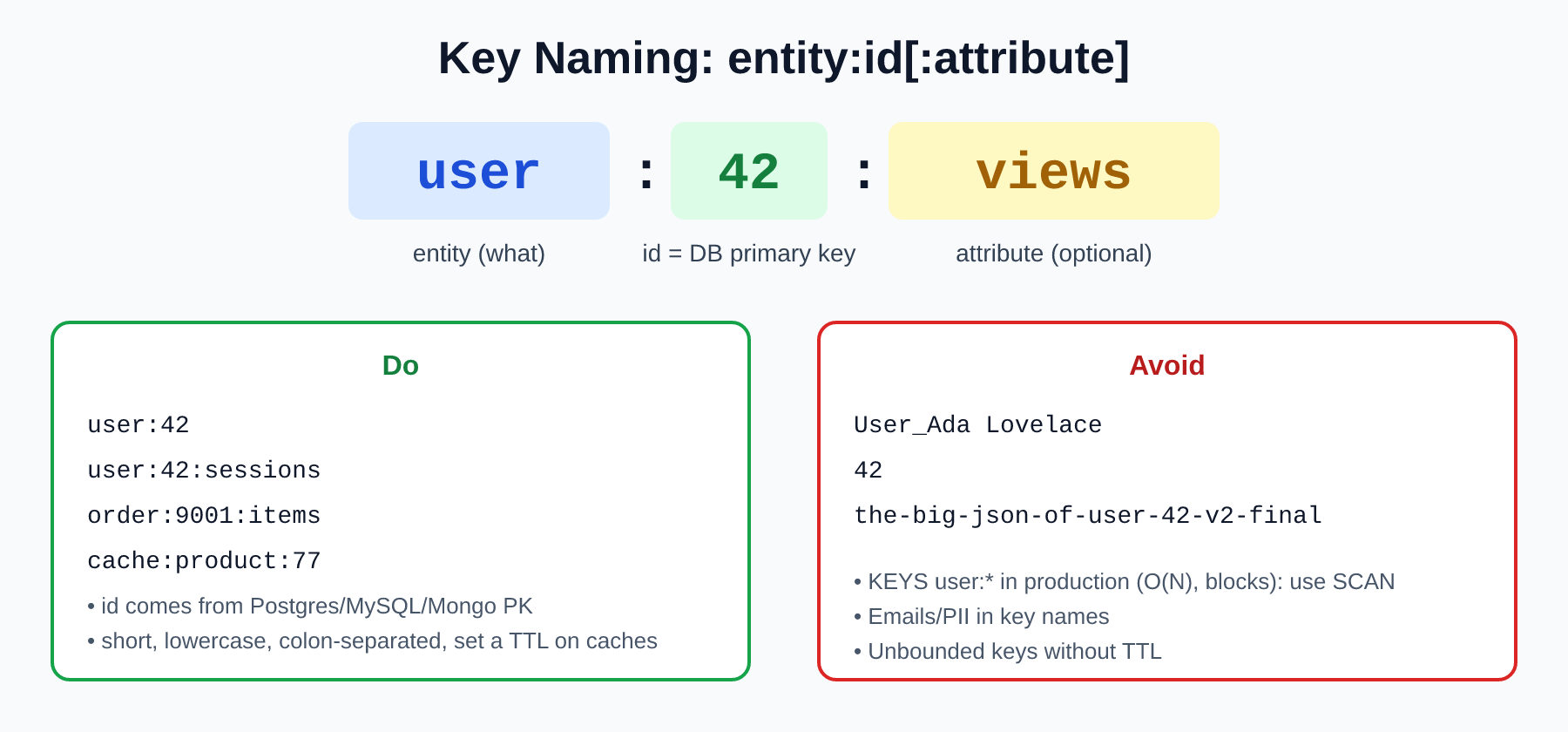
Redis has no tables, so your key names are your schema. Use entity:id, where id is the primary key from your main database (Postgres users.id, Mongo _id, etc.). That gives you a trivial cache lookup (user:42 ↔ row 42), easy invalidation, and greppable keys.
export const keys = {
  user: (id) => `user:${id}`,                       // user:42
  userCounter: (id, name) => `user:${id}:${name}`,  // user:42:views
  cart: (userId) => `cart:${userId}`,               // cart:42
};
Rules of thumb:
- Lowercase, colon-separated, short. Keys are stored in memory too.
- Never put PII (emails) in key names. They show up in logs and
MONITOR. - Set a TTL on anything that is a cache.
- Never run
KEYS user:*in production (O(N), blocks the server). UseSCAN.
2. Strings
The most basic type: binary-safe bytes. Store text, JSON, numbers, or serialized blobs.
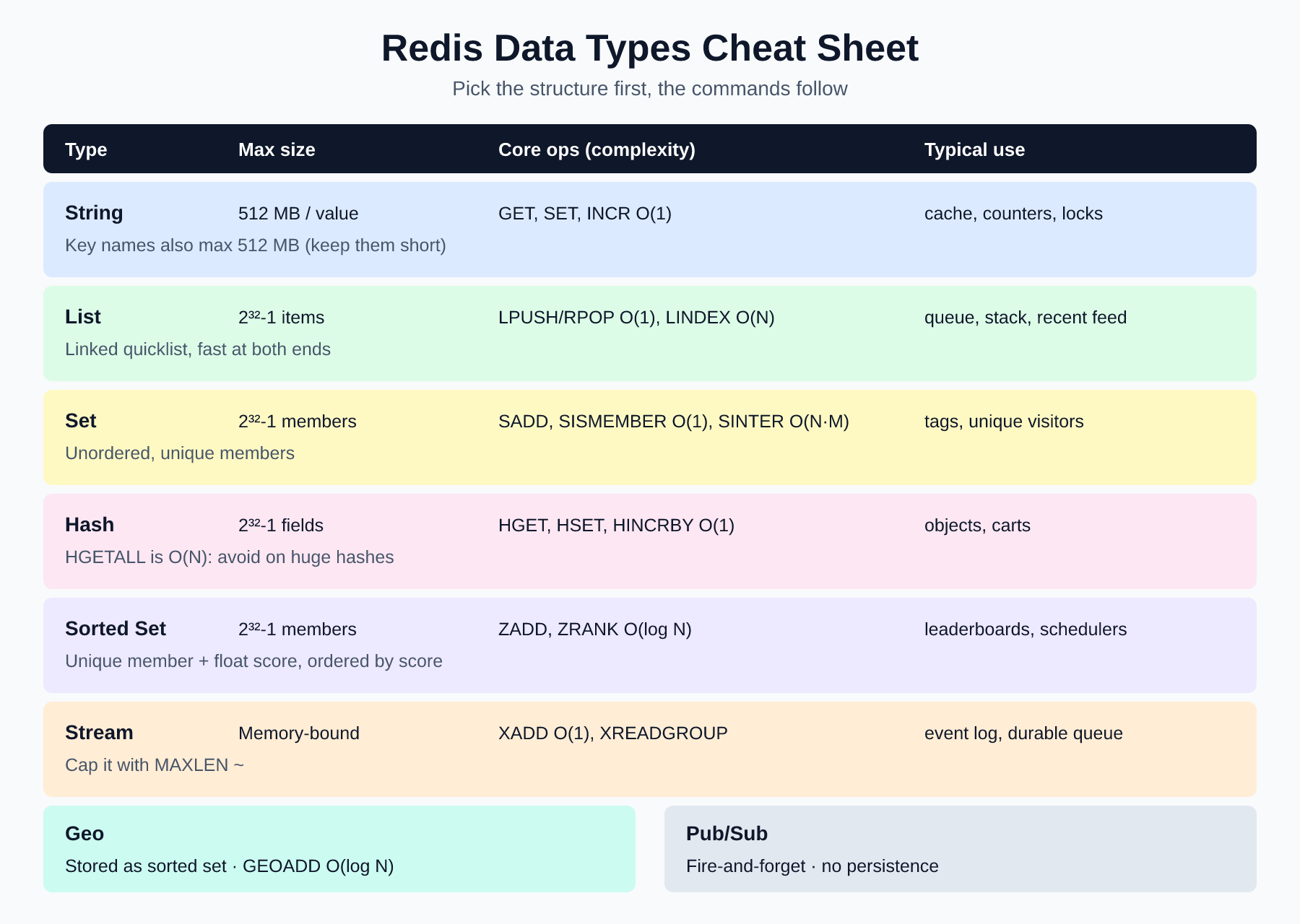
| Max size | 512 MB per value (and per key name, but keep keys tiny) |
| Performance | GET, SET, INCR: O(1) |
| Tip | Values under ~100 KB are ideal. Big values hurt network latency and block the single-threaded server |
SET / GET
We can set a key-value pair like this way.
SET user:42 "{\"id\":42,\"name\":\"Ada\"}"
Now we can retrive this by this command
GET user:42
For above key-pair value we don't set any TTL(expiry time). So, it will be saved unless the redis server shuts down. We can explicitly set the TTL like this way
SET cache:homepage "<html/>" EX 60 # expires in 60s
We can check the decreased TTL using this command
TTL cache:homepage
The equivalent JS code in nodejs.
await redis.set('user:42', JSON.stringify({ id: 42, name: 'Ada' }));
const user = JSON.parse(await redis.get('user:42'));
await redis.set('cache:homepage', '<html/>', { EX: 60 });
The nil concept
A missing key returns nil in the CLI and null in Node. Treat null as a cache miss, not an error.
GET user:999999
(nil)
The equivalent JS code in nodejs.
const cached = await redis.get('user:999999'); // null
if (cached === null) { /* load from DB, then SET with TTL (cache-aside) */ }
NX / XX: conditional writes
NX sets only if the key does not exist. This is the building block for locks and idempotency keys.
SET lock:report worker-1 NX EX 10   # OK
SET lock:report worker-2 NX EX 10   # (nil), someone else holds it
The equivalent JS code in nodejs.
const acquired = await redis.set('lock:report', 'worker-1', { NX: true, EX: 10 }); // 'OK' | null
Always add EX so a crashed worker can't hold the lock forever. (For multi-node production locks, look at Redlock and understand its trade-offs.)
Increment / decrement
Atomic, so there are no race conditions between concurrent requests.
INCR user:42:views
INCRBY user:42:views 10
DECR user:42:views
In JS,
await redis.incr('user:42:views');
await redis.incrBy('user:42:views', 10);
await redis.decr('user:42:views');
Use cases: caching DB rows/API responses, session tokens, page-view counters, rate limiting (INCR + EXPIRE), distributed locks, idempotency keys.
3. Lists
Ordered collection of strings, implemented as a linked list of compact nodes (quicklist/listpack).
| Max size | 2³²−1 (~4.29 billion) elements |
| Performance | LPUSH/RPUSH/LPOP/RPOP: O(1). LLEN: O(1). LINDEX/LRANGE: O(N), so avoid middle access on large lists |
Push, pop, length
LPUSH jobs a b c        # list is now: c b a
RPOP jobs               # "a"
LLEN jobs
LRANGE jobs 0 -1
In JS,
await redis.lPush('jobs', ['a', 'b', 'c']);
await redis.rPop('jobs');
await redis.lLen('jobs');
await redis.lRange('jobs', 0, -1);
Stack (LIFO) and queue (FIFO)
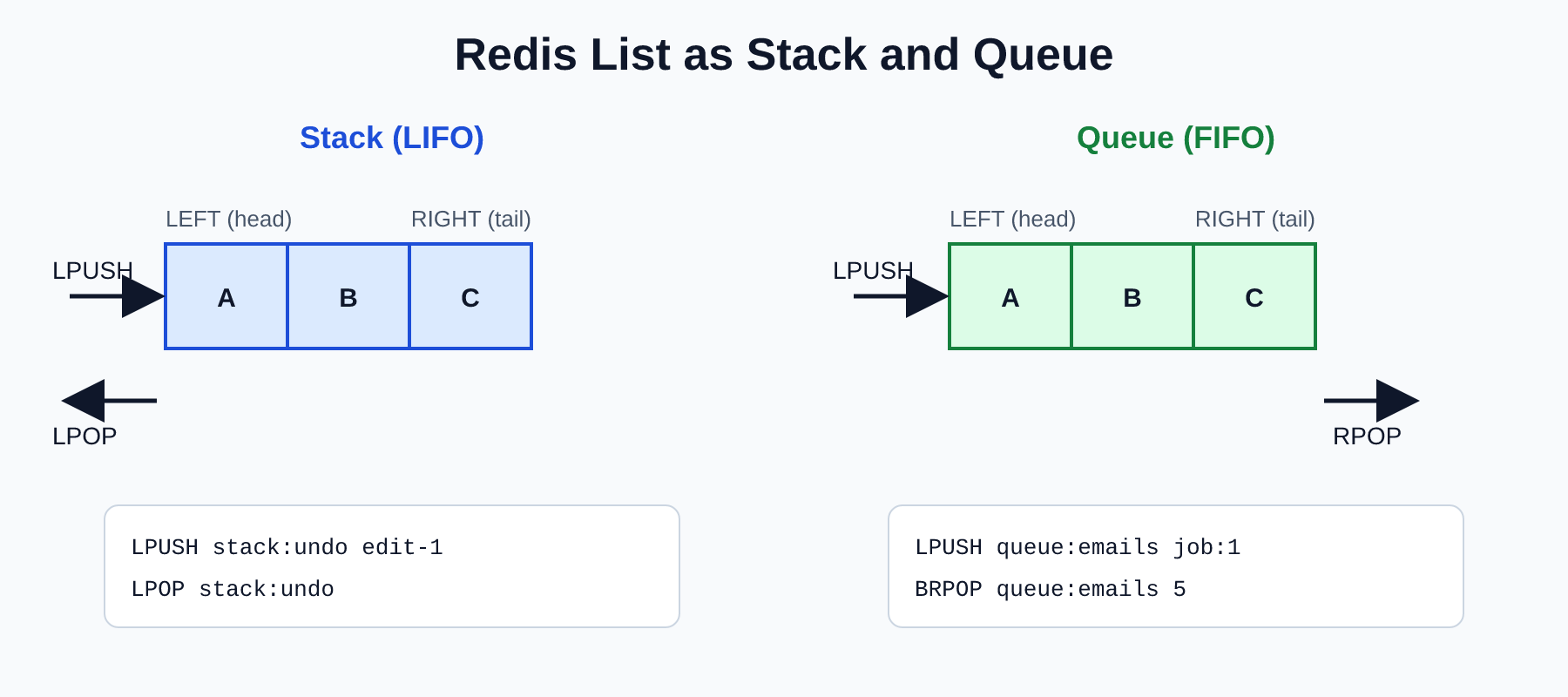
// Stack: push and pop from the same end
await redis.lPush('stack:undo', 'edit-1');
await redis.lPop('stack:undo');

// Queue: producer pushes left, consumer pops right
await redis.lPush('queue:emails', 'job:1');
const job = await redis.brPop('queue:emails', 5); // { key, element } | null (blocks up to 5s)
Use blocking pops (BRPOP) in workers instead of polling in a loop.
⚠️ A plain list queue has no acknowledgement: if a worker crashes after popping, the job is lost. Use
LMOVE/BLMOVEto a "processing" list, or better, a Stream with consumer groups (section 7).
Remove items and cap a list
LREM feed 0 "b"        # remove ALL "b" (count 0 = all, >0 = from head, <0 = from tail)
LTRIM feed 0 99        # keep only the latest 100
In JS,
await redis.lRem('feed', 0, 'b');
await redis.lTrim('feed', 0, 99);
Use cases: job queues, undo stacks, "latest N" activity feeds (LPUSH + LTRIM), simple message buffers.
4. Sets
Unordered collection of unique strings.
| Max size | 2³²−1 members |
| Performance | SADD/SREM/SISMEMBER/SCARD: O(1). SINTER: O(N·M) worst case. SMEMBERS: O(N) |
| Tip | For large sets, iterate with SSCAN, not SMEMBERS |
SADD post:1:tags redis node docker     # (integer) 3
SADD post:2:tags node kafka docker
SISMEMBER post:1:tags redis            # 1
SCARD post:1:tags                      # 3
SINTER post:1:tags post:2:tags         # "node" "docker"
SREM post:1:tags docker
The JS code,
await redis.sAdd('post:1:tags', ['redis', 'node', 'docker']); // returns number added
await redis.sIsMember('post:1:tags', 'redis');                 // 1 (RESP2 returns 1/0)
await redis.sCard('post:1:tags');                              // 3
await redis.sInter(['post:1:tags', 'post:2:tags']);            // ['node', 'docker']
await redis.sRem('post:1:tags', 'docker');
Also worth knowing: SUNION, SDIFF, and the *STORE variants (SINTERSTORE) that save the result in a new key.
Use cases: unique visitors per day (visitors:2026-11-20), tags, "mutual friends" (SINTER friends:1 friends:2), online users, de-duplicating events.
5. Hashes
A map of field→value under one key. This is the natural fit for objects.
| Max size | 2³²−1 field/value pairs |
| Performance | HGET/HSET/HINCRBY: O(1). HGETALL: O(N) |
| Tip | Small hashes use a very compact encoding. Prefer one hash per entity over many string keys. Redis 7.4+ supports per-field TTL (HEXPIRE) |
HSET user:42:profile name Ada email ada@example.com logins 0 credits 100
HGET user:42:profile name
HGETALL user:42:profile
HINCRBY user:42:profile logins 1
HINCRBY user:42:profile credits -25      # decrement = negative increment
HINCRBYFLOAT user:42:profile balance 9.99
await redis.hSet('user:42:profile', { name: 'Ada', logins: 0, credits: 100 });
await redis.hGet('user:42:profile', 'name');
await redis.hGetAll('user:42:profile');            // all values come back as strings!
await redis.hIncrBy('user:42:profile', 'logins', 1);
await redis.hIncrBy('user:42:profile', 'credits', -25);
Hashes vs JSON strings: use a hash when you update fields independently or need atomic per-field counters. Use a string when you always read and write the whole object.
Use cases: user profiles/sessions, shopping carts (cart:42 → { "sku:100": 2 }), per-entity counters, feature flags.
6. Sorted Sets (ZSET)
Like a set, but every member has a score, and members are kept ordered by score.
| Max size | 2³²−1 members |
| Performance | ZADD/ZREM/ZRANK/ZINCRBY: O(log N). Range reads: O(log N + M) |
| Note | Scores are 64-bit floats (exact integers up to 2⁵³). Ties are ordered lexicographically |
ZADD leaderboard:global 1200 user:1 980 user:2 1500 user:3
ZINCRBY leaderboard:global 300 user:2
ZRANGE leaderboard:global 0 2 REV WITHSCORES   # top 3
ZREVRANK leaderboard:global user:2
ZSCORE leaderboard:global user:1
await redis.zAdd('leaderboard:global', [
  { score: 1200, value: 'user:1' },
  { score: 1500, value: 'user:3' },
]);
await redis.zIncrBy('leaderboard:global', 300, 'user:2');
const top3 = await redis.zRangeWithScores('leaderboard:global', 0, 2, { REV: true });
const rank = await redis.zRevRank('leaderboard:global', 'user:2'); // 0-based
Use cases: leaderboards, delayed job queues (score = run-at timestamp, poll with ZRANGEBYSCORE 0 now), sliding-window rate limiters, "trending" lists, priority queues.
7. Streams
An append-only log with auto-generated IDs (<ms>-<seq>), consumer groups, and acknowledgements. Think "lightweight Kafka" for moderate scale.
| Max size | Limited only by memory. Always cap with MAXLEN ~ |
| Performance | XADD: O(1). XREADGROUP: O(M) for M returned entries. XRANGE: O(log N + M) |
XADD stream:orders MAXLEN ~ 10000 * orderId 101 status created
XLEN stream:orders
XGROUP CREATE stream:orders billing 0 MKSTREAM
XREADGROUP GROUP billing worker-1 COUNT 2 STREAMS stream:orders >
XACK stream:orders billing 1795194364290-0
XPENDING stream:orders billing
await redis.xAdd('stream:orders', '*', { orderId: '101', status: 'created' }, {
  TRIM: { strategy: 'MAXLEN', strategyModifier: '~', threshold: 10_000 },
});

await redis.xGroupCreate('stream:orders', 'billing', '0', { MKSTREAM: true });

const res = await redis.xReadGroup('billing', 'worker-1', { key: 'stream:orders', id: '>' }, { COUNT: 2 });
for (const { messages } of res ?? []) {
  for (const { id, message } of messages) {
    // ...process...
    await redis.xAck('stream:orders', 'billing', id);
  }
}
Key ideas:
- Each message in a group is delivered to one consumer.
- Unacked messages stay in the pending list. Reclaim crashed workers' messages with
XAUTOCLAIM. - Messages are not deleted on read, so you can replay them.
Use cases: event sourcing/audit logs, reliable background jobs, order pipelines, activity streams.
8. Geospatial
Geo commands are a thin layer over a sorted set (coordinates encoded as a 52-bit geohash score).
| Max size | Same as sorted sets (2³²−1 members) |
| Performance | GEOADD: O(log N). GEOSEARCH: O(N + log M), where N is the number of items in the searched area's bounding box |
| Limits | Latitude must be within ±85.05112878°. Precision is sub-meter. Longitude comes first in every command |
GEOADD stores:geo 90.4125 23.8103 store:1 90.3910 23.7509 store:2
GEODIST stores:geo store:1 store:2 km
GEOSEARCH stores:geo FROMLONLAT 90.40 23.78 BYRADIUS 15 km ASC WITHDIST
await redis.geoAdd('stores:geo', [
  { longitude: 90.4125, latitude: 23.8103, member: 'store:1' },
  { longitude: 90.3910, latitude: 23.7509, member: 'store:2' },
]);

const nearby = await redis.geoSearchWith(
  'stores:geo',
  { longitude: 90.40, latitude: 23.78 },
  { radius: 15, unit: 'km' },
  ['WITHDIST'],
  { SORT: 'ASC' },
);
// [{ member: 'store:2', distance: 3.36 }, { member: 'store:1', distance: 3.60 }]
Because it's a sorted set, delete members with ZREM.
Use cases: "stores/drivers near me", ride-hailing matching, delivery radius checks, geofencing.
9. Pub/Sub
Fire-and-forget messaging. Publishers send to a channel; every currently connected subscriber gets a copy.
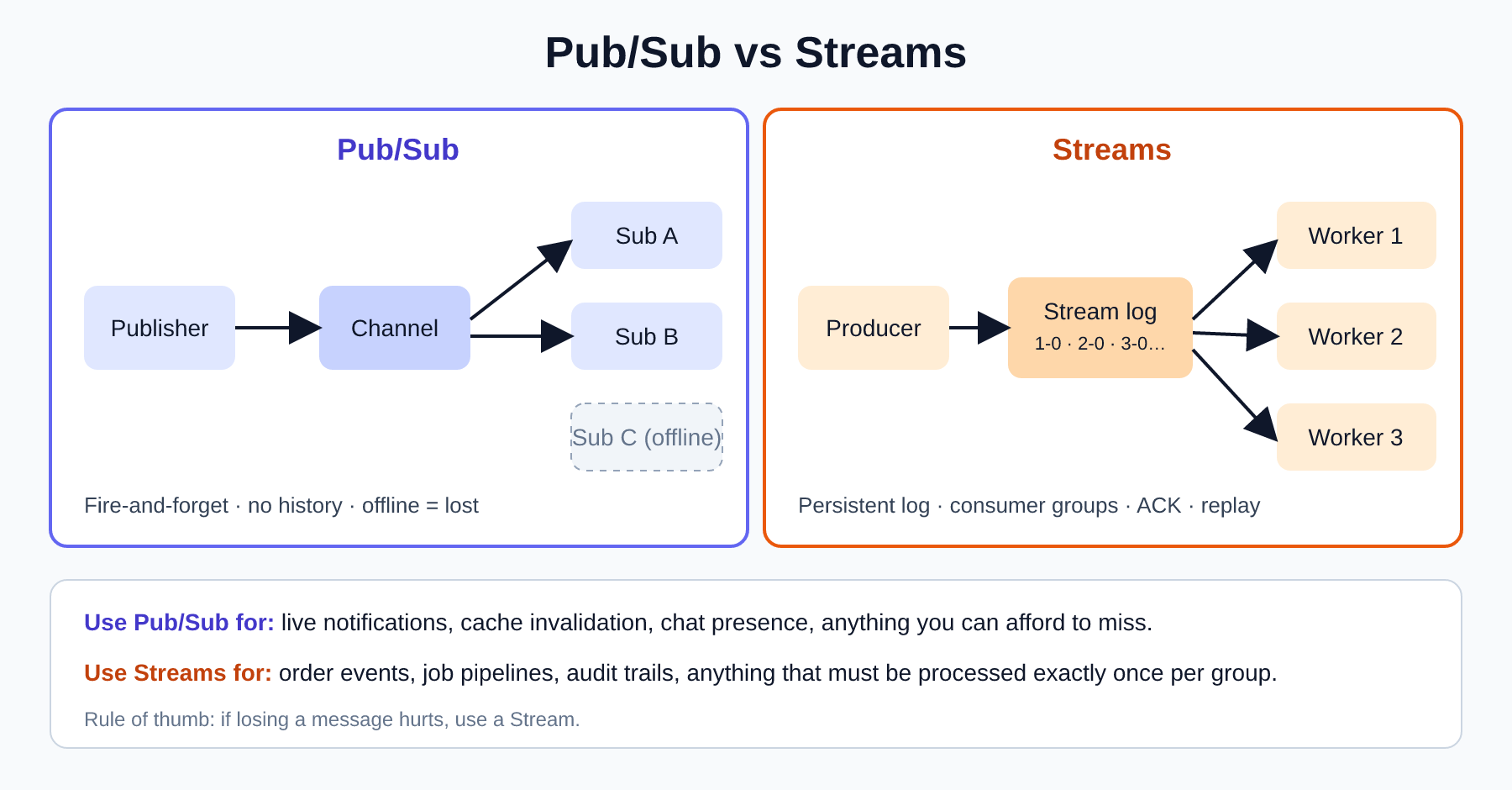
| Delivery | At-most-once, with no persistence. Offline subscribers miss messages |
| Performance | PUBLISH: O(N + M), N subscribers on the channel and M matching patterns |
# terminal 1
SUBSCRIBE channel:notifications
# terminal 2
PUBLISH channel:notifications "order 101 paid"
const sub = redis.duplicate();   // a subscriber connection can't run normal commands
await sub.connect();
await sub.subscribe('channel:notifications', (message, channel) => console.log(channel, message));
await sub.pSubscribe('channel:*', (message, channel) => { /* pattern match */ });

await redis.publish('channel:notifications', JSON.stringify({ type: 'order.paid', orderId: 101 }));
Use cases: real-time notifications, chat, cache invalidation across app instances, WebSocket fan-out between servers. If losing a message would hurt, use a Stream.
10. What I'd add to take this further
Topics worth knowing for the next level:
- Expiration & eviction.
EXPIRE/TTL,maxmemory+maxmemory-policy(allkeys-lru,volatile-ttl, ...). - Persistence. RDB snapshots vs AOF, and when to use which.
- Transactions & pipelining.
MULTI/EXEC,WATCH,client.multi(), and Lua scripts for atomic multi-step logic. - Caching patterns. Cache-aside, write-through, cache stampede protection, TTL jitter.
- Big-key hygiene.
SCAN/SSCAN/HSCAN,UNLINKinstead ofDELfor huge keys,MEMORY USAGE. - Other types. Bitmaps, HyperLogLog (approximate unique counts in 12 KB), Redis JSON and Search.
- Scaling & HA. Replication, Sentinel, Cluster (hash slots,
{hash-tags}). - Security. ACLs,
requirepass, TLS, never expose port 6379 publicly.
Quick reference
| Need | Use |
|---|---|
| Cache / counter / lock | String |
| Queue (simple) / recent items | List |
| Unique things, set math | Set |
| Object with fields | Hash |
| Ranking / scheduling | Sorted Set |
| Durable events + consumer groups | Stream |
| Nearby search | Geo |
| Ephemeral broadcast | Pub/Sub |
Remember: Redis executes commands on a single thread. O(1) commands are blazing fast, but one slow O(N) command on a huge key stalls everyone.
Comments
Join the discussionNo comments yet. Be the first to comment.