React Performance in Practice: Memoization, Lazy Loading and Code Splitting
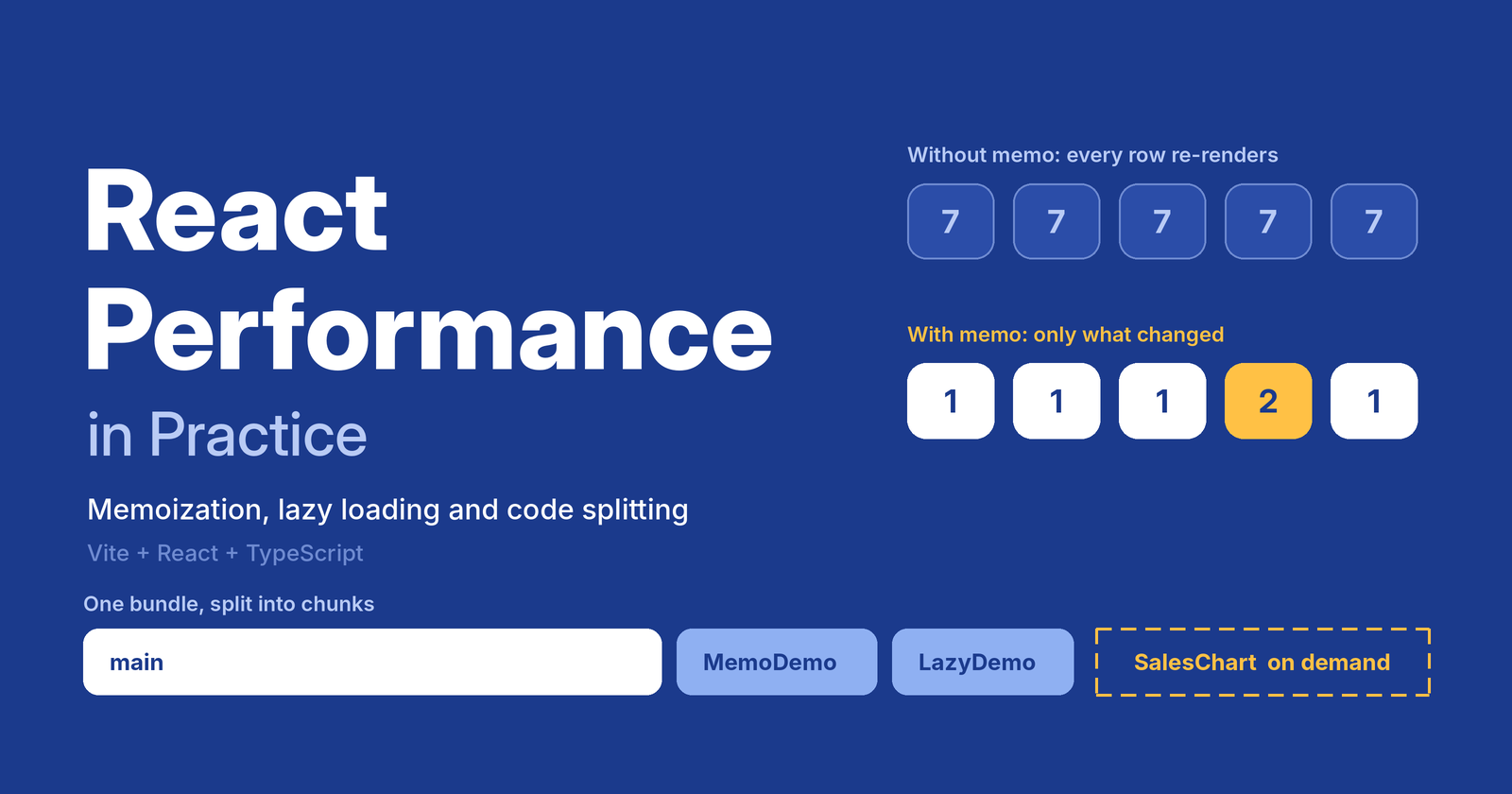
Most React apps are not slow because React is slow. They are slow because of two things:
- Too much work on render (components re-rendering and recalculating when nothing relevant changed).
- Too much JavaScript on load (users download code for screens they may never open).
This post covers the tools for each problem, with a small Vite + TypeScript demo you can run yourself. It assumes you know the basics of hooks and TypeScript.
Rule zero: measure first. Use React DevTools Profiler and the browser's Network tab. Optimizing without a measured problem adds complexity for no gain.
Setup
npm create vite@latest react-performance-demo -- --template react-ts
cd react-performance-demo
npm install
npm run dev
The demo repo has two tabs: Memoization and Lazy loading. Everything below comes from it.
Part 1: Memoization
Why components re-render
A component re-renders when its state changes, or when its parent re-renders. That second rule is the one that bites. A parent updating an unrelated counter re-renders every child, even if their props are identical.
Re-rendering is usually cheap. It becomes a problem when a component does heavy work or renders a long list.
The three tools
| Tool | What it caches | Use it for |
|---|---|---|
React.memo |
A component's rendered output | Skipping re-renders when props did not change |
useMemo |
A computed value | Expensive calculations |
useCallback |
A function reference | Keeping props stable for memoized children |
The "before": no memoization
export function NaivePanel({ query }: { query: string }) {
  const [favorites, setFavorites] = useState<Set<number>>(new Set())

  // Runs on EVERY render, even if `query` did not change.
  const filtered = products.filter((p) =>
    p.name.toLowerCase().includes(query.toLowerCase()),
  )
  const stats = computeStats(filtered) // pretend this is expensive

  // New function identity on every render.
  const toggle = (id: number) =>
    setFavorites((prev) => {
      const next = new Set(prev)
      next.has(id) ? next.delete(id) : next.add(id)
      return next
    })

  return (
    <ul>
      {filtered.slice(0, 15).map((p) => (
        <ProductRow key={p.id} product={p} isFavorite={favorites.has(p.id)} onToggle={toggle} />
      ))}
    </ul>
  )
}
Click an unrelated button in the parent and this panel recalculates the stats and re-renders all 15 rows.
The "after": memoized
// 1. memo: skip re-rendering when the parent passes the same props
export const OptimizedPanel = memo(function OptimizedPanel({ query }: { query: string }) {
  const [favorites, setFavorites] = useState<Set<number>>(new Set())

  // 2. useMemo: redo the work only when `query` changes
  const filtered = useMemo(
    () => products.filter((p) => p.name.toLowerCase().includes(query.toLowerCase())),
    [query],
  )
  const stats = useMemo(() => computeStats(filtered), [filtered])

  // 3. useCallback: stable function identity, so memoized rows are not invalidated
  const toggle = useCallback((id: number) => {
    setFavorites((prev) => {
      const next = new Set(prev)
      next.has(id) ? next.delete(id) : next.add(id)
      return next
    })
  }, [])

  return (
    <ul>
      {filtered.slice(0, 15).map((p) => (
        <MemoProductRow key={p.id} product={p} isFavorite={favorites.has(p.id)} onToggle={toggle} />
      ))}
    </ul>
  )
})
And the row, wrapped once:
export const MemoProductRow = memo(ProductRow)
What to notice
- The three tools work as a set.
memoon a row is useless if you pass it a newonTogglefunction on every render.useCallbackis what makesmemoeffective. setFavorites(prev => ...)removes the dependency. Using the functional update meanstogglenever needsfavoritesin its dependency array, so it stays stable forever.- Pass primitives where you can. The row receives
isFavorite(a boolean), not the wholefavoritesset. Otherwise every row would re-render whenever any favorite changed. - Same for objects and arrays.
style={{ color: 'red' }}oritems={[1, 2]}creates a new reference each render and quietly defeatsmemo.
When NOT to memoize
Memoization is not free. It costs memory, adds dependency arrays to maintain, and makes code harder to read. Skip it when:
- the component is cheap and rarely re-renders,
- its props change on almost every render anyway,
- you have not measured a problem.
Good candidates: long lists, heavy calculations, components that re-render often because of a busy parent.
Note: the React Compiler can add much of this memoization automatically at build time. It is still worth understanding the manual version, because it explains what the compiler is doing and you will meet this pattern in existing codebases.
Part 2: Code splitting and lazy loading
The problem
By default, bundlers ship your whole app as one JavaScript file. The user pays the download and parse cost for every screen up front.
Code splitting breaks the bundle into chunks. Lazy loading downloads those chunks only when needed. In practice you do both with the dynamic import() function.
Route-level splitting (best first step)
Each page becomes its own chunk. This usually gives the biggest win for the least effort.
import { lazy, Suspense } from 'react'

// lazy() needs a default export
const MemoDemo = lazy(() => import('./features/memoization/MemoDemo'))
const LazyDemo = lazy(() => import('./features/lazy/LazyDemo'))

export default function App() {
  const [tab, setTab] = useState<'memo' | 'lazy'>('memo')

  return (
    <ErrorBoundary>
      <Suspense fallback={<p>Loading page…</p>}>
        {tab === 'memo' ? <MemoDemo /> : <LazyDemo />}
      </Suspense>
    </ErrorBoundary>
  )
}
With React Router the idea is identical: wrap each route's element in lazy().
Component-level splitting (heavy widgets)
Charts, rich text editors, maps and PDF viewers are classic candidates. They are large and often hidden until the user asks for them.
const loadChart = () => import('./SalesChart') // pulls in recharts
const SalesChart = lazy(loadChart)

export default function LazyDemo() {
  const [showChart, setShowChart] = useState(false)

  return (
    <>
      <button
        onMouseEnter={loadChart} // preload on intent
        onFocus={loadChart}
        onClick={() => setShowChart((v) => !v)}
      >
        {showChart ? 'Hide' : 'Show'} sales chart
      </button>

      {showChart && (
        <ErrorBoundary>
          <Suspense fallback={<p>Loading chart…</p>}>
            <SalesChart />
          </Suspense>
        </ErrorBoundary>
      )}
    </>
  )
}
Three details that separate a quick demo from production-ready code:
Suspenseis required. It renders the fallback while the chunk downloads.- Wrap lazy components in an error boundary. Chunks can fail to load (offline, or a new deploy removed the old file). Without a boundary, the whole tree crashes.
- Preload on intent. Calling
loadChart()on hover or focus starts the download before the click, so the user rarely sees the spinner. Calling it more than once is safe, the module is only fetched once.
Prove it with the build
npm run build
dist/assets/LazyDemo-_k2EPYU5.js      0.95 kB │ gzip:   0.56 kB
dist/assets/MemoDemo-B-QBqGES.js      3.40 kB │ gzip:   1.37 kB
dist/assets/index-BiLuuANc.js       222.82 kB │ gzip:  69.95 kB
dist/assets/SalesChart-BHgEXjG0.js  369.35 kB │ gzip: 106.15 kB
The chart library (about 369 kB, 106 kB gzipped) is its own file. Users who never open the chart never download it. Without lazy(), those bytes would sit in the main bundle for everyone. You can also confirm this in the browser: open the Network tab, throttle to "Slow 4G", and click the button.
Quick checklist
- Measure with the React Profiler and the Network tab before optimizing.
- Split by route first, then by heavy components.
- Always pair
lazywithSuspenseand an error boundary. - Preload chunks on hover or focus.
- Use
memo+useCallback+ stable props together, not alone. - Use
useMemofor genuinely expensive work, not for every variable. - Keep list
keys stable and unique (not array indexes for dynamic lists).
Running the demo
I've tested this in Node 26+. Here is the codebase.
npm install
npm run dev     # development server
npm run build   # production build, shows the chunk sizes
npm run preview # serve the production build locally
Wrapping up
Performance work in React comes down to two questions: "why is this rendering?" and "why is the user downloading this?" Memoization answers the first by skipping unnecessary work. Code splitting answers the second by shipping less code up front. Both are most effective when you measure first and apply them where the numbers show a problem.
Comments
Join the discussionNo comments yet. Be the first to comment.