PostgreSQL Date & Time: The Working Engineer's Cheat Sheet

Dates are where "it works on my machine" queries go to die: DST shifts, month-end overflow, inclusive BETWEEN on timestamps, ISO-year mismatches. This is a fast, opinionated refresher for people who already write SQL daily. Every example runs against one small schema.
Schema
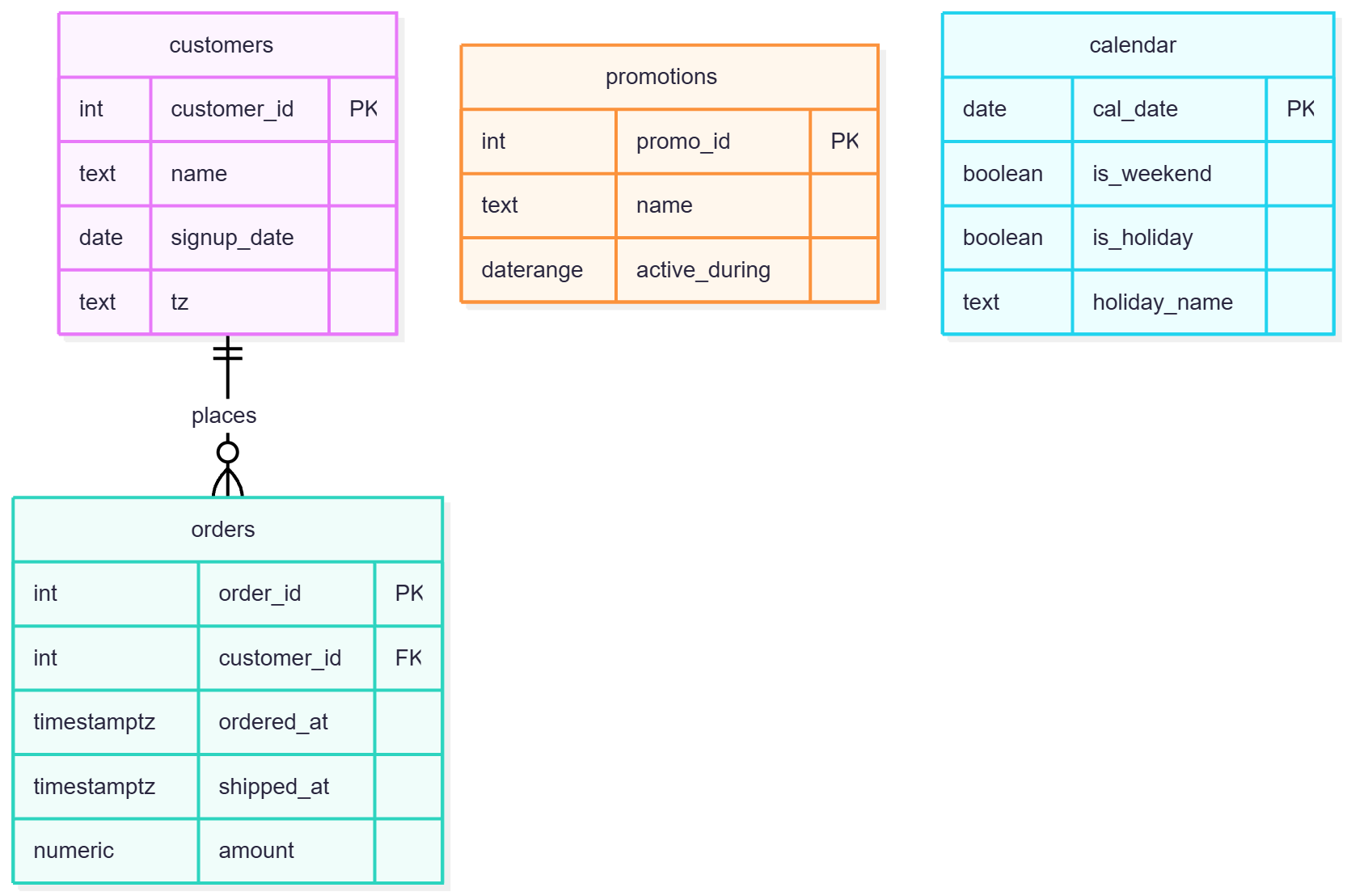
Here is the ER diagram of our schema.
CREATE SCHEMA IF NOT EXISTS dt_demo;
SET search_path = dt_demo;

CREATE TABLE customers (
    customer_id  int GENERATED ALWAYS AS IDENTITY PRIMARY KEY,
    name         text NOT NULL,
    signup_date  date NOT NULL,
    tz           text NOT NULL            -- IANA zone name
);

CREATE TABLE orders (
    order_id     int GENERATED ALWAYS AS IDENTITY PRIMARY KEY,
    customer_id  int NOT NULL REFERENCES customers,
    ordered_at   timestamptz NOT NULL,
    shipped_at   timestamptz,
    amount       numeric(10,2) NOT NULL
);

CREATE TABLE promotions (
    promo_id       int GENERATED ALWAYS AS IDENTITY PRIMARY KEY,
    name           text NOT NULL,
    active_during  daterange NOT NULL
);

CREATE TABLE calendar (
    cal_date      date PRIMARY KEY,
    is_weekend    boolean NOT NULL,
    is_holiday    boolean NOT NULL DEFAULT false,
    holiday_name  text
);
Dummy data
Timestamps are relative to now() so every rolling-window example stays meaningful whenever you run it.
INSERT INTO customers (name, signup_date, tz) VALUES
  ('Alice', current_date - 500, 'America/New_York'),
  ('Bob',   current_date - 300, 'Europe/London'),
  ('Chen',  current_date - 40,  'Asia/Dhaka');

INSERT INTO orders (customer_id, ordered_at, shipped_at, amount) VALUES
  (1, now() - interval '2 days',   now() - interval '1 day 4 hours',  120.00),
  (2, now() - interval '5 days',   NULL,                               60.00),  -- not shipped
  (1, now() - interval '9 days',   now() - interval '8 days 2 hours',  80.50),
  (3, now() - interval '15 days',  now() - interval '13 days',        200.00),
  (2, now() - interval '31 days',  now() - interval '29 days',         45.25),
  (3, now() - interval '45 days',  now() - interval '44 days',         99.99),
  (1, now() - interval '75 days',  now() - interval '72 days',        310.00),
  (2, now() - interval '100 days', now() - interval '97 days',         70.00),
  (1, now() - interval '200 days', now() - interval '198 days',       150.00),
  (2, now() - interval '330 days', now() - interval '327 days',        90.00),
  (1, now() - interval '370 days', now() - interval '368 days',       130.00),
  (2, now() - interval '400 days', now() - interval '397 days',       175.00);

INSERT INTO promotions (name, active_during) VALUES
  ('Spring Sale',  daterange(current_date - 30, current_date - 10)),  -- [) by default
  ('Flash Friday', daterange(current_date - 15, current_date + 5)),
  ('Year-End',     daterange(current_date + 30, current_date + 60));

-- Calendar table: ~13 months back, 1 year forward
INSERT INTO calendar (cal_date, is_weekend)
SELECT d::date, EXTRACT(ISODOW FROM d) IN (6, 7)
FROM generate_series(current_date - 400, current_date + 365, interval '1 day') AS d;

UPDATE calendar
SET is_holiday = true,
    holiday_name = CASE to_char(cal_date, 'MM-DD')
                     WHEN '12-25' THEN 'Christmas' ELSE 'New Year' END
WHERE to_char(cal_date, 'MM-DD') IN ('12-25', '01-01');
1. Current date/time
SELECT CURRENT_DATE,            -- date
       CURRENT_TIME,            -- timetz
       NOW(),                   -- timestamptz, = transaction_timestamp()
       clock_timestamp();       -- real wall clock, changes within a statement
NOW() is frozen at transaction start. In a long transaction or a pg_sleep loop, use clock_timestamp() if you need real elapsed time.
2. Extracting parts
SELECT EXTRACT(YEAR   FROM ordered_at) AS yr,
       EXTRACT(DOW    FROM ordered_at) AS dow,      -- 0 = Sunday
       EXTRACT(ISODOW FROM ordered_at) AS isodow,   -- 1 = Monday .. 7 = Sunday
       EXTRACT(EPOCH  FROM ordered_at) AS epoch,
       DATE_PART('month', ordered_at)  AS mon       -- same thing, older syntax
FROM orders LIMIT 3;
EXTRACTreturnsnumeric(PG14+),DATE_PARTreturnsdouble precision. PreferEXTRACT, it is standard SQL.- Extraction on
timestamptzuses the session time zone. Always be explicit (see section 8).
3. Truncating
-- Monthly revenue
SELECT DATE_TRUNC('month', ordered_at) AS month, SUM(amount)
FROM orders
GROUP BY 1 ORDER BY 1;

-- Truncate in a specific zone (PG12+): day boundaries in Dhaka, not UTC
SELECT DATE_TRUNC('day', ordered_at, 'Asia/Dhaka') AS dhaka_day, COUNT(*)
FROM orders GROUP BY 1 ORDER BY 1;
DATE_TRUNC is your bucketing primitive. For arbitrary buckets (15 min, 2 weeks) use date_bin() (PG14+).
4. Date arithmetic
SELECT current_date + 7                         AS plus_7_days,      -- date + int = date
       current_date + interval '1 month'        AS plus_1_month,     -- timestamp
       now() - interval '90 minutes'            AS ninety_min_ago,
       DATE '2024-01-31' + interval '1 month'   AS month_end_clamp;  -- 2024-02-29
Gotchas worth remembering:
interval '1 month'is calendar-aware and clamps at month end.- On
timestamptz,+ interval '1 day'moves by a calendar day in the session zone (DST-safe), while+ interval '24 hours'is exactly 24 hours. They differ on DST days.
5. Differences
SELECT order_id,
       shipped_at - ordered_at                               AS ship_interval,
       EXTRACT(EPOCH FROM shipped_at - ordered_at) / 3600    AS ship_hours,
       AGE(shipped_at, ordered_at)                           AS ship_age
FROM orders
WHERE shipped_at IS NOT NULL;

SELECT current_date - signup_date AS days_since_signup,  -- date - date = integer
       AGE(signup_date)           AS tenure               -- symbolic: years, mons, days
FROM customers;
date - dategives an integer number of days.timestamp - timestampgives an interval (days + time, never months).AGE()returns symbolic years/months/days. Great for display, wrong for math. For math, subtract and useEXTRACT(EPOCH ...).
6. Formatting
SELECT TO_CHAR(ordered_at, 'YYYY-MM-DD HH24:MI')  AS iso_like,
       TO_CHAR(ordered_at, 'Dy, DD Mon YYYY')     AS human,
       TO_CHAR(ordered_at, 'IYYY-"W"IW')          AS iso_week,   -- 2026-W45
       TO_CHAR(amount, 'FM999,990.00')            AS money
FROM orders LIMIT 3;
Formatting belongs at the presentation layer. If it ends up in a GROUP BY or JOIN, you probably wanted DATE_TRUNC.
7. Parsing
SELECT TO_DATE('09/11/2026', 'DD/MM/YYYY')                AS d,
       TO_TIMESTAMP('2026-11-09 14:30', 'YYYY-MM-DD HH24:MI') AS ts,  -- timestamptz
       TO_TIMESTAMP(1762700000)                           AS from_epoch;
TO_TIMESTAMP(text, fmt)interprets input in the session zone. Pass a zone explicitly if the source is not local.- For clean ISO input, a plain cast (
'2026-11-09'::date) is faster and stricter. - Format patterns are forgiving about separators and padding (
TO_DATE('2026/1/5','YYYY-MM-DD')works), so validate shape upstream if input is untrusted.
8. Time zones
-- timestamptz -> local wall-clock (returns timestamp WITHOUT tz)
SELECT o.order_id,
       o.ordered_at AT TIME ZONE c.tz AS local_time
FROM orders o JOIN customers c USING (customer_id);

-- local wall-clock -> timestamptz (returns timestamptz)
SELECT TIMESTAMP '2026-11-09 09:00' AT TIME ZONE 'Asia/Dhaka';
The rule that stops the confusion:
| Input type | AT TIME ZONE 'X' returns |
Meaning |
|---|---|---|
timestamptz |
timestamp |
"What does the wall clock read in X?" |
timestamp |
timestamptz |
"This wall-clock reading is in X; make it an instant" |
Store timestamptz, convert at the edge, use IANA names (Asia/Dhaka), never fixed offsets like +06.
9. Date series
-- Gap-filled daily revenue for the last 14 days
SELECT d::date AS day, COALESCE(SUM(o.amount), 0) AS revenue
FROM generate_series(current_date - 13, current_date, interval '1 day') AS d
LEFT JOIN orders o ON o.ordered_at >= d AND o.ordered_at < d + interval '1 day'
GROUP BY 1 ORDER BY 1;
generate_series with dates and an interval returns timestamptz, so cast back with ::date. Always LEFT JOIN from the series, never the other way round, or the gaps disappear.
10. ISO weeks
SELECT ordered_at::date,
       EXTRACT(ISODOW  FROM ordered_at) AS isodow,
       EXTRACT(WEEK    FROM ordered_at) AS iso_week,   -- ISO 8601 week
       EXTRACT(ISOYEAR FROM ordered_at) AS iso_year,
       DATE_TRUNC('week', ordered_at)   AS week_start   -- always Monday
FROM orders LIMIT 5;
Pair IW with IYYY, never YYYY. Around New Year, 2026-12-31 can belong to ISO week 53 of 2026 or week 1 of 2027, and mixing the two silently mislabels data.
11. Ranges and BETWEEN
-- Wrong for timestamps: BETWEEN is inclusive on both ends
SELECT * FROM orders
WHERE ordered_at BETWEEN '2026-10-01' AND '2026-10-31';  -- drops Oct 31 after 00:00

-- Right: half-open interval
SELECT * FROM orders
WHERE ordered_at >= '2026-10-01' AND ordered_at < '2026-11-01';
Native range types do this properly:
-- Which promotions are active today?
SELECT name FROM promotions WHERE active_during @> current_date;

-- Which promotions overlap each other?
SELECT a.name, b.name
FROM promotions a JOIN promotions b
  ON a.promo_id < b.promo_id AND a.active_during && b.active_during;

-- Orders placed during any promotion
SELECT DISTINCT o.order_id
FROM orders o JOIN promotions p ON p.active_during @> o.ordered_at::date;
Bonus: add EXCLUDE USING gist (active_during WITH &&) (needs btree_gist for scoped variants) to make overlaps impossible at the constraint level. daterange defaults to [), which is exactly what you want for non-overlapping periods.
12. Business days: use a calendar table
Don't compute business days with arithmetic; holidays make it unsolvable in closed form.
-- Business days between order and shipment (end exclusive)
SELECT o.order_id,
       (SELECT COUNT(*)
        FROM calendar c
        WHERE c.cal_date >= o.ordered_at::date
          AND c.cal_date <  o.shipped_at::date
          AND NOT c.is_weekend
          AND NOT c.is_holiday) AS business_days_to_ship
FROM orders o
WHERE o.shipped_at IS NOT NULL;

-- Next business day after a given date
SELECT MIN(cal_date) FROM calendar
WHERE cal_date > current_date AND NOT is_weekend AND NOT is_holiday;
A calendar table also gives you fiscal periods, week labels, and holiday flags with plain joins. The weekend definition is data, not code, so Fri/Sat-weekend regions are a one-line change.
13. Period comparisons (MoM, YoY)
WITH monthly AS (
    SELECT DATE_TRUNC('month', ordered_at) AS m, SUM(amount) AS revenue
    FROM orders GROUP BY 1
)
SELECT cur.m::date,
       cur.revenue,
       prev_m.revenue AS prev_month,
       prev_y.revenue AS prev_year,
       ROUND(100 * (cur.revenue - prev_m.revenue) / NULLIF(prev_m.revenue, 0), 1) AS mom_pct,
       ROUND(100 * (cur.revenue - prev_y.revenue) / NULLIF(prev_y.revenue, 0), 1) AS yoy_pct
FROM monthly cur
LEFT JOIN monthly prev_m ON prev_m.m = cur.m - interval '1 month'
LEFT JOIN monthly prev_y ON prev_y.m = cur.m - interval '1 year'
ORDER BY cur.m;
Self-joining on the shifted date is safer than LAG() because LAG compares the previous row, which is wrong the moment a month has no data. Use LAG only on a gap-free series.
14. Rolling periods
-- Last 7 / 30 / 90 days in a single pass
SELECT SUM(amount) FILTER (WHERE ordered_at >= now() - interval '7 days')  AS last_7d,
       SUM(amount) FILTER (WHERE ordered_at >= now() - interval '30 days') AS last_30d,
       SUM(amount) FILTER (WHERE ordered_at >= now() - interval '90 days') AS last_90d
FROM orders;
For a true rolling window per day, build a gap-free series first, then use a RANGE frame with an interval (PG11+):
WITH daily AS (
    SELECT d::date AS day, COALESCE(SUM(o.amount), 0) AS revenue
    FROM generate_series(current_date - 120, current_date, interval '1 day') AS d
    LEFT JOIN orders o ON o.ordered_at >= d AND o.ordered_at < d + interval '1 day'
    GROUP BY 1
)
SELECT day,
       revenue,
       SUM(revenue) OVER (ORDER BY day
                          RANGE BETWEEN interval '6 days' PRECEDING AND CURRENT ROW) AS rolling_7d
FROM daily
ORDER BY day;
now() - interval '7 days' is a rolling 168 hours. If the business means "the last 7 calendar days including today", anchor on date_trunc('day', now()) - interval '6 days'. Decide which one you mean, then document it.
Cheat sheet: things that bite
| Trap | Fix |
|---|---|
BETWEEN on timestamps |
>= start AND < next_start |
NOW() inside long transactions |
clock_timestamp() |
AT TIME ZONE direction confusion |
timestamptz -> wall clock, timestamp -> instant |
YYYY with IW |
IYYY with IW |
AGE() for math |
Subtract, then EXTRACT(EPOCH ...) |
LAG() over gappy months |
Self-join on m - interval '1 month' |
| Hardcoded UTC offsets | IANA zone names |
| Computing business days | Calendar table |
interval '24 hours' vs '1 day' |
Pick based on DST semantics you need |
Written for PostgreSQL 14+. date_bin needs 14+, date_trunc(..., tz) needs 12+, RANGE frames with intervals need 11+.
Comments
Join the discussionNo comments yet. Be the first to comment.