Understanding AI Agents from First Principles
1. Start with the right question
When I start to learn agent, then first I thought it could be "install framework X and run this." Then one of my friend told me that you will end up with something that works in the demo and that you can't debug in production.
The better first question is:
What makes an agent different from a normal LLM application?
A normal LLM app: the developer owns the control flow
User input → [your code builds prompt] → LLM → output
Even a RAG pipeline or a 5-step chain is this. The developer decides in code which steps run and in what order. The LLM fills in blanks.
docs = retrieve(question)                  # step 1: always runs
answer = llm(f"Context: {docs}\nQ: {question}")  # step 2: always runs
An agent: the model owns the control flow
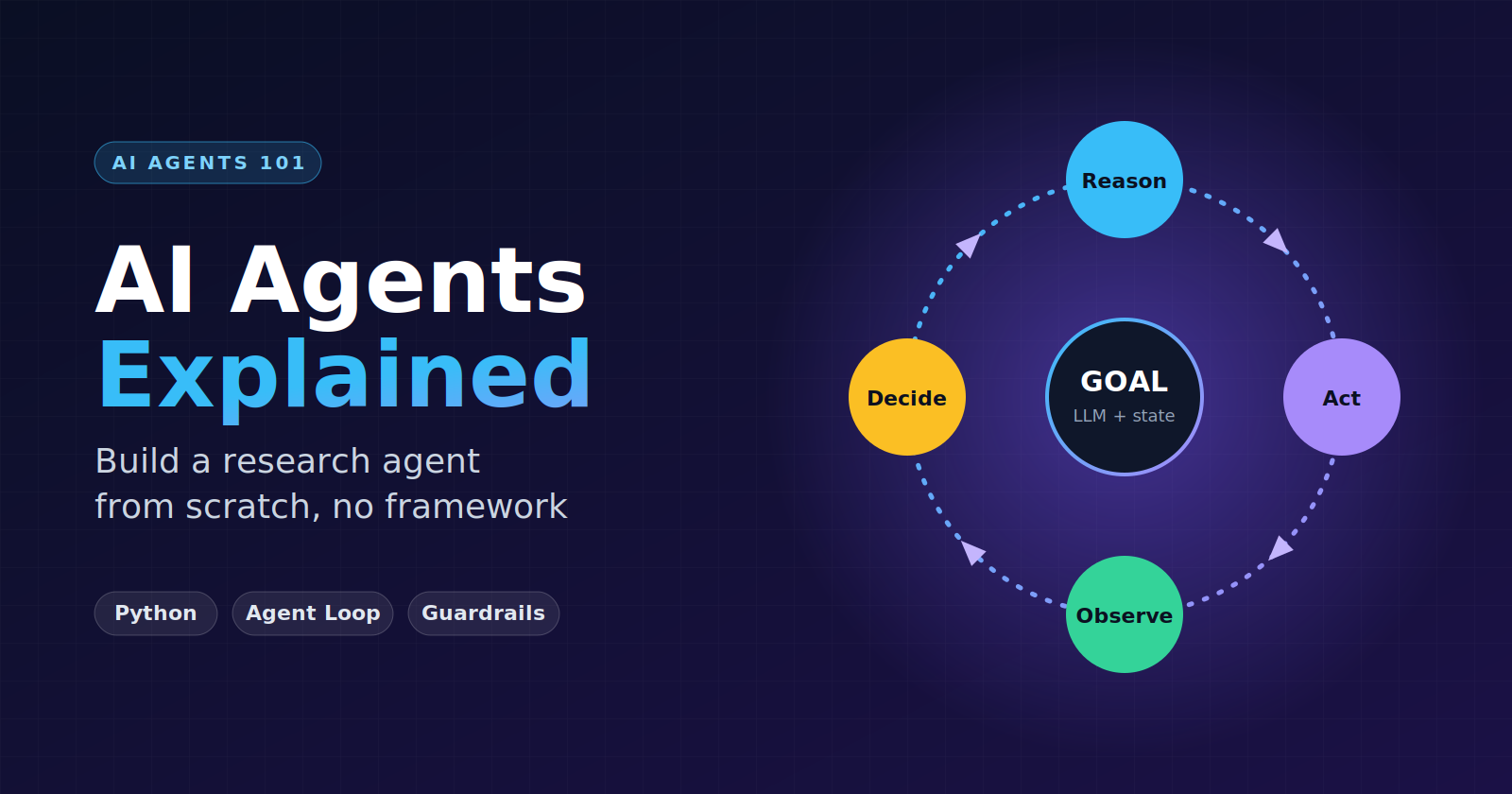
Goal → [LLM decides next action] → execute → observe → [LLM decides again] → ... → done
The model decides what to do next, when it has enough information, and when to stop. The number of steps isn't known in advance.
| LLM application | Agent | |
|---|---|---|
| Control flow | Fixed by developer | Chosen by model at runtime |
| Number of steps | Known | Unknown |
| Tools | Called by your code | Selected by the model |
| State | Usually stateless | Accumulates across steps |
| Failure surface | Bad output | Bad output, bad decisions, loops, wrong tool use, runaway cost |
| Debugging | Read the prompt and response | Read an entire trajectory |
🧠 The core insight: An agent is an LLM in a loop with tools and state. Everything else (planning, memory, reflection, multi-agent) is a refinement of that sentence.
It's a spectrum, not a binary
Anthropic's "Building Effective Agents" guidance draws a useful line:
Workflows: LLMs and tools orchestrated through predefined code paths.
Agents: LLMs dynamically direct their own process and tool usage.
⚠️ Engineering rule of thumb: Use the least autonomy that solves the problem. If a fixed pipeline works, use the pipeline. Agents trade predictability for flexibility, and you should only pay that cost when the task needs it, meaning open-ended problems where you can't predict the steps.
2. The agent loop
This is the mental model to burn into memory:
        ┌──────────────────────────────────────┐
        │                                      │
        ▼                                      │
      Goal                                     │
        ↓                                      │
  Reason / Plan                                │
        ↓                                      │
   Select Tool                                 │
        ↓                                      │
   Execute Tool   ← (your code, not the LLM)   │
        ↓                                      │
  Observe Result                               │
        ↓                                      │
 Continue or Finish? ──── continue ────────────┘
        │
      finish
        ↓
      Answer
The most important detail: the LLM never executes anything
The LLM only emits text describing the action it wants, such as {"tool": "web_search", "args": {"query": "..."}}. Your code parses that, runs the real function, and feeds the result back as the next message.
That means:
You control what tools exist.
You control validation, timeouts, permissions, and budgets.
Every safety mechanism lives in the loop around the model.
The loop in 15 lines of pseudocode
def agent(goal, tools, max_steps=10):
    state = [{"role": "user", "content": goal}]
    for step in range(max_steps):         # hard budget
        decision = llm(state)             # reason + choose
        if decision.is_final:
            return decision.answer
        result = run_tool(decision.tool, decision.args)  # execute
        state.append(decision)            # remember what I did
        state.append(observation(result)) # remember what happened
    return "Stopped: step budget exhausted"
Every agent framework is a more elaborate version of this snippet.
3. The building blocks
3.1 Planning
The problem: Complex goals can't be solved in one step. "Compare the top 3 vector databases for our use case" contains many sub-questions.
Two common approaches:
| Approach | How it works | Strength | Weakness |
|---|---|---|---|
| Plan-then-execute | Generate the full task list up front, then run it | Predictable, easy to inspect, parallelizable | Brittle if early results invalidate the plan |
| ReAct (interleaved) | Think → act → observe → think, one step at a time | Adapts to what it finds | Can wander, harder to bound |
In practice, the strongest simple design is a hybrid: plan up front, then use a small ReAct loop per task. That's what we'll build.
🔍 Plans are data. Make the planner output structured JSON (a list of tasks) so your code can iterate over it, log it, and let a human edit it.
3.2 Tool selection
The model chooses a tool based on the tool descriptions you wrote. Tool descriptions are effectively prompts.
Good tool design:
Clear name and one-sentence purpose.
web_search, nottool_1.Narrow responsibility. Two focused tools beat one "do everything" tool.
Typed arguments you can validate.
Helpful errors.
"ERROR: url must start with http"is better than a stack trace, because the model reads it and can recover.Bounded output. Truncate. A tool returning 200KB of HTML will wreck your context window.
Common failures: picking the wrong tool, hallucinating a tool that doesn't exist, passing malformed arguments, or calling a tool when it already has the answer.
3.3 State
State is everything the agent knows about the current run: the goal, the plan, the action history, tool results, and intermediate findings.
Two ways to hold it:
Implicit: the growing message list. Simple, but the context fills up.
Explicit: a structured object your code controls.
@dataclass
class AgentState:
    goal: str
    plan: list[str]
    completed: dict[str, list]   # task → findings
    steps_used: int
    tokens_used: int
Explicit state is what makes an agent debuggable, resumable, and testable. If your agent crashes at step 14, you want to resume from a saved object rather than rerun everything.
3.4 Short-term memory
Short-term memory is the context window: the messages the model can see right now.
The problem is that it's finite and every step adds to it. Strategies:
Truncate tool outputs at the source.
Summarize old steps: compress steps 1–10 into a paragraph.
Keep only what's needed: for a sub-task, pass the findings, not the raw pages.
Scope contexts: give each sub-task its own fresh message list (our project does this).
📉 Long contexts don't just cost more. Model attention degrades over a cluttered context, so a bloated history leads to worse decisions.
3.5 Long-term memory
Long-term memory is information that persists across runs, stored outside the model.
| Type | Example | Typical storage |
|---|---|---|
| Semantic (facts) | "User prefers APA citations" | Key-value store, vector DB |
| Episodic (experiences) | "Last time, this query failed because the site blocks scrapers" | Logs of past trajectories |
| Procedural (how-to) | A learned workflow or refined prompt | Prompt files, skill libraries |
The usual pattern is write (decide what's worth saving), store (DB/vector index), retrieve (fetch relevant memories at the start of a run and inject them into the prompt).
The hard part isn't storage, it's deciding what to remember and keeping memory from going stale or wrong. Bad memories cause confident, repeated mistakes.
3.6 Reflection
Reflection means the agent critiques its own work and improves it.
Draft → Critique ("what's missing, unsupported, wrong?") → Revise
It's powerful for research tasks because the critic can check claims against sources. Cheap version: one extra LLM call with a checklist.
Caveats:
Models can be sycophantic toward their own output.
Reflection with no new information often just rephrases. It works best when the critic gets something concrete to check (sources, test results, a rubric).
Cap it, because unbounded reflection is just another infinite loop.
3.7 Multi-agent systems
Multiple agents with different roles (planner, researcher, writer, critic) collaborating.
Why do it:
Separate contexts keep each agent focused.
Parallelism (researchers run simultaneously).
Specialized prompts and tools per role.
Why to be careful:
Coordination overhead and cost multiply.
Errors compound across handoffs.
Debugging becomes distributed-systems debugging.
🧭 Guidance: Don't start multi-agent. Build one agent that works. Split it only when you can name a concrete problem the split solves, such as context overflow or parallelizable subtasks. Our project is technically "planner + worker + writer + critic," but they're just functions with different prompts, which is the honest form of multi-agent design.
4. How agents fail (and what to do about it)
This section matters most for real systems. Agents fail in ways normal software doesn't, because the control flow is probabilistic.
4.1 Failure modes
| Failure | What it looks like | Mitigation |
|---|---|---|
| Infinite loops | Same search repeated 20 times | Step budget, duplicate-call detection, repeated-state detection |
| Tool errors | Timeout, 404, malformed args, rate limit | Catch exceptions, return readable errors, retry with backoff, let the model adapt |
| Hallucinated tools/args | Calls search_google_scholar which doesn't exist |
Validate names and schemas; return the list of valid tools |
| Goal drift | Starts researching a tangent | Re-inject the goal each step, keep tasks narrow |
| Premature finish | Declares done after one weak search | Require evidence/citations, add a critic |
| Never finishing | Keeps "just checking one more thing" | Hard budgets, explicit "finish with what you have" step |
| Context overflow | Output degrades, or the API errors | Truncate tool output, summarize history |
| Error compounding | Early wrong assumption poisons everything | Validate intermediate results, keep tasks independent |
| Unsupported claims | Report says things no source states | Force citations, verify claims against stored sources |
| Cost blowups | Runaway token spend | Token and cost ceilings per run |
| Prompt injection | A fetched web page says "ignore your instructions and..." | Treat tool output as untrusted data, never as instructions; restrict tool powers |
4.2 Guardrails: where they live
Guardrails are code around the model, not requests to the model. Asking nicely in the prompt is not a guardrail.
Input guardrails   →  validate the goal (scope, policy, length)
Loop guardrails    →  max steps, token/time budget, duplicate detection
Tool guardrails    →  allowlist, argument validation, timeouts, read-only by default
Output guardrails  →  schema validation, citation checks, human approval for risky actions
A principle worth memorizing: least privilege. Our research agent gets read-only tools. If an agent could send emails or delete data, you'd add human-in-the-loop confirmation before those actions.
4.3 Handling infinite loops specifically
Layer your defenses:
Hard cap on steps (non-negotiable).
Duplicate detection: if
(tool, args)repeats, don't execute, and tell the model.Forced finalization: when the budget runs out, make one last call: "Finish now using what you have."
Observability: log every step so you can see why it looped.
4.4 Handling tool errors
Errors should be observations, not crashes:
try:
    result = tool(**args)
except Exception as e:
    result = f"ERROR: {type(e).__name__}: {e}"   # the model reads this and adapts
A model that sees ERROR: 404 for that URL will usually try another source. A crashed program won't.
5. Project: build an AI research agent (no framework)
Goal: Receive a question → break it into tasks → search and retrieve → analyze → produce a structured report.
Architecture
Question
   ↓
[Planner]            → list of research tasks (JSON)
   ↓
for each task:
  [Worker loop]      → reason → search/fetch → observe → ... → findings
   ↓
[Analyst/Writer]     → structured report with citations
   ↓
[Critic]             → gaps & unsupported claims → (optional) revise
   ↓
Final report (Markdown)
Setup
pip install anthropic ddgs requests beautifulsoup4
export ANTHROPIC_API_KEY=your_key
The code uses Anthropic's SDK, but the only provider-specific part is the 3-line
llm()function. Swap it for any provider. Check the current model name in the docs and adjustMODEL.
Step 1: The LLM wrapper and a JSON helper
import json
import re
from anthropic import Anthropic

client = Anthropic()
MODEL = "claude-sonnet-5-5"  # change to whichever model you use


def llm(system: str, messages: list[dict], max_tokens: int = 2000) -> str:
    response = client.messages.create(
        model=MODEL,
        system=system,
        messages=messages,
        max_tokens=max_tokens,
    )
    return response.content[0].text


def parse_json(text: str):
    """Models sometimes wrap JSON in prose or code fences. Extract the first JSON blob."""
    match = re.search(r"(\{.*\}|\[.*\])", text, re.S)
    if not match:
        raise ValueError("No JSON found in model output")
    return json.loads(match.group(1))
Step 2: Tools
Two tools: one to discover sources, one to read them.
import requests
from bs4 import BeautifulSoup
from ddgs import DDGS


def web_search(query: str, k: int = 5) -> list[dict]:
    """Search the web. Returns title, url, snippet for each result."""
    results = DDGS().text(query, max_results=k)
    return [
        {"title": r["title"], "url": r["href"], "snippet": r["body"]}
        for r in results
    ]


def fetch_page(url: str, max_chars: int = 4000) -> str:
    """Fetch a web page and return its visible text (truncated)."""
    if not url.startswith(("http://", "https://")):
        raise ValueError("url must start with http:// or https://")
    html = requests.get(
        url, timeout=10, headers={"User-Agent": "research-agent/0.1"}
    ).text
    soup = BeautifulSoup(html, "html.parser")
    for tag in soup(["script", "style", "nav", "footer"]):
        tag.decompose()
    return soup.get_text(" ", strip=True)[:max_chars]


TOOLS = {"web_search": web_search, "fetch_page": fetch_page}


def run_tool(name: str, args: dict) -> str:
    """Tool guardrail: unknown tools and exceptions become observations, not crashes."""
    if name not in TOOLS:
        return f"ERROR: unknown tool '{name}'. Available tools: {list(TOOLS)}"
    try:
        output = TOOLS[name](**args)
        return json.dumps(output)[:6000]   # bound the output size
    except Exception as e:
        return f"ERROR: {type(e).__name__}: {e}"
Notice what the tool layer already gives you: an allowlist, error handling, and output truncation.
Step 3: The planner
PLANNER_SYSTEM = """You are a research planner.
Break the user's question into 3-5 specific, independent research tasks.
Each task should be answerable via web search.
Respond with ONLY a JSON array of strings."""


def plan(question: str) -> list[str]:
    raw = llm(PLANNER_SYSTEM, [{"role": "user", "content": question}])
    tasks = parse_json(raw)
    return tasks[:5]   # guardrail: cap the plan size
Step 4: The agent loop (the heart of it)
Each task gets its own small loop and its own fresh context.
WORKER_SYSTEM = """You are a research worker. Complete the task using tools.

Respond with ONLY one JSON object, in one of these forms:

{"thought": "...", "action": "web_search", "args": {"query": "..."}}
{"thought": "...", "action": "fetch_page", "args": {"url": "..."}}
{"thought": "...", "action": "finish",
 "findings": [{"claim": "...", "source": "https://..."}]}

Rules:
- Only state claims supported by tool results. Every claim needs a source URL.
- Do not repeat an identical tool call.
- Prefer reading a promising page over searching again and again.
- Finish as soon as you have enough evidence."""


def run_task(task: str, max_steps: int = 6) -> list[dict]:
    messages = [{"role": "user", "content": f"Task: {task}"}]
    seen_calls = set()

    for step in range(max_steps):
        raw = llm(WORKER_SYSTEM, messages)

        # 1) Parse the model's decision
        try:
            decision = parse_json(raw)
        except Exception:
            messages += [
                {"role": "assistant", "content": raw},
                {"role": "user", "content": "Invalid JSON. Reply with ONLY the JSON object."},
            ]
            continue

        print(f"  [step {step + 1}] {decision.get('action')}: {decision.get('thought', '')[:100]}")

        # 2) Finish?
        if decision.get("action") == "finish":
            return decision.get("findings", [])

        # 3) Loop guardrail: detect repeated calls
        action = decision.get("action", "")
        args = decision.get("args", {})
        call_key = (action, json.dumps(args, sort_keys=True))
        if call_key in seen_calls:
            observation = "ERROR: You already made this exact call. Try something different or finish."
        else:
            seen_calls.add(call_key)
            observation = run_tool(action, args)   # 4) Execute

        # 5) Observe: feed the result back
        messages += [
            {"role": "assistant", "content": raw},
            {"role": "user", "content": f"Observation: {observation}"},
        ]

    # Budget exhausted → force finalization instead of looping forever
    messages.append({
        "role": "user",
        "content": 'Step budget exhausted. Finish now with {"action": "finish", "findings": [...]} using what you have.',
    })
    try:
        return parse_json(llm(WORKER_SYSTEM, messages)).get("findings", [])
    except Exception:
        return []
Map this to the loop from Section 2:
| Loop stage | Where in the code |
|---|---|
| Reason / Plan | llm(WORKER_SYSTEM, messages) returns a thought |
| Select tool | decision["action"] |
| Execute | run_tool(action, args) |
| Observe | the Observation: message appended to state |
| Continue / Finish | if action == "finish" or loop again |
| Loop guardrails | max_steps, seen_calls, forced finalization |
Step 5: Analysis and report generation
WRITER_SYSTEM = """You are a research analyst. Write a structured report in Markdown.

Use exactly these sections:
# Title
## Executive Summary
## Key Findings   (bullet points; each ends with a source link)
## Analysis       (synthesize, compare, note disagreements between sources)
## Limitations & Open Questions
## Sources

Rules: Use ONLY the provided findings. Do not add outside facts.
If findings conflict or are thin, say so explicitly."""


def write_report(question: str, all_findings: dict[str, list[dict]]) -> str:
    payload = json.dumps(all_findings, indent=2)
    return llm(
        WRITER_SYSTEM,
        [{"role": "user", "content": f"Question: {question}\n\nFindings:\n{payload}"}],
        max_tokens=3000,
    )
Step 6: Reflection (one critic pass)
CRITIC_SYSTEM = """You are a strict reviewer. Compare the report to the findings.
List: (1) claims in the report NOT supported by the findings,
(2) important aspects of the question left unanswered.
Respond with ONLY JSON: {"unsupported": [...], "gaps": [...]}"""


def critique(question: str, report: str, findings: dict) -> dict:
    content = f"Question: {question}\n\nFindings:\n{json.dumps(findings)}\n\nReport:\n{report}"
    return parse_json(llm(CRITIC_SYSTEM, [{"role": "user", "content": content}]))


def revise(report: str, feedback: dict) -> str:
    return llm(
        "Revise the report. Remove unsupported claims and flag the listed gaps under Limitations. Output the full Markdown report.",
        [{"role": "user", "content": f"Report:\n{report}\n\nFeedback:\n{json.dumps(feedback)}"}],
        max_tokens=3000,
    )
Step 7: The orchestrator
def research(question: str) -> str:
    print(f"\n🎯 Question: {question}")

    tasks = plan(question)
    print(f"\n📋 Plan:")
    for i, t in enumerate(tasks, 1):
        print(f"  {i}. {t}")

    all_findings = {}
    for task in tasks:
        print(f"\n🔎 Task: {task}")
        all_findings[task] = run_task(task)

    print("\n✍️  Writing report...")
    report = write_report(question, all_findings)

    print("🧐 Reviewing...")
    feedback = critique(question, report, all_findings)
    if feedback.get("unsupported") or feedback.get("gaps"):
        report = revise(report, feedback)    # exactly one revision: bounded reflection

    return report


if __name__ == "__main__":
    q = "What are the main trade-offs between RAG and fine-tuning for adding domain knowledge to an LLM?"
    print(research(q))
Run it and read the printed trajectory. Watching the agent's steps teaches you more than any diagram.
6. What to do after it works
Now that you have a working baseline, these exercises build real intuition.
Break it on purpose
| Experiment | What you'll learn |
|---|---|
Set max_steps=1 |
What a budget cutoff does to quality |
| Remove the duplicate-call check and ask a vague question | How loops actually form |
Make fetch_page randomly fail 50% of the time |
Whether the model recovers from tool errors |
| Delete "every claim needs a source" from the prompt | How quickly unsupported claims creep in |
| Add a page containing "ignore previous instructions" | Prompt injection from tool output |
Upgrade the design
Native tool calling. Replace the hand-rolled JSON protocol with the provider's tool-use API. It's more reliable because the model is trained for it, and you'll understand exactly what it's replacing.
Explicit state. Replace message lists with an
AgentStatedataclass and save it to disk after each step, so a crashed run can resume.Parallelism. Run tasks concurrently with
asyncioor a thread pool, since they're independent.Cost tracking. Count tokens per run and enforce a ceiling.
Long-term memory. Cache fetched pages and prior findings in SQLite or a vector store so repeated questions get cheaper and faster.
Evaluation. Write 10–20 test questions with expected facts and score your agent. Without evals you're guessing whether changes help.
Tracing. Log every step as JSON, then look at tools like Langfuse or LangSmith.
Then, and only then, look at frameworks
Once you've built this, frameworks (LangGraph, the OpenAI Agents SDK, the Claude Agent SDK, CrewAI) stop being magic. You'll recognize each as a packaged version of something you wrote:
| You built | Framework gives you |
|---|---|
while loop with budget |
Managed runtime with retries and streaming |
| Message list / state object | Checkpointing, persistence, resumability |
TOOLS dict + run_tool |
Tool schemas, validation, MCP integration |
| Sequential task list | Graph orchestration, branching, parallel nodes |
print() statements |
Tracing and observability dashboards |
You can now judge whether a framework's abstractions earn their complexity for your use case.
7. Key takeaways
An agent is an LLM in a loop with tools and state, where the model controls the flow.
The model proposes, your code disposes. Tools execute in your code, so safety lives there.
Use the least autonomy that works. Prefer fixed workflows when the steps are predictable.
Plan-then-execute plus a small ReAct loop is a solid default architecture.
State and memory are context engineering. Keep what's needed and drop the rest.
Failure modes are the real curriculum. Budgets, duplicate detection, error-as-observation, and forced finalization are not optional.
Reflection needs something concrete to check, and it must be bounded.
Build it yourself first, then adopt a framework because you know what you want from it.