Prompt Engineering for Beginners: From Simple to Smart
A friendly guide with short examples. No big words. Just clear steps.
What is a prompt?
A prompt is the message you give to an AI.
Prompt engineering means writing that message well, so the AI gives you a better answer.
Think of AI as a very smart helper who cannot read your mind. If you give a small hint, it will guess. If you give clear steps, it will do what you want.
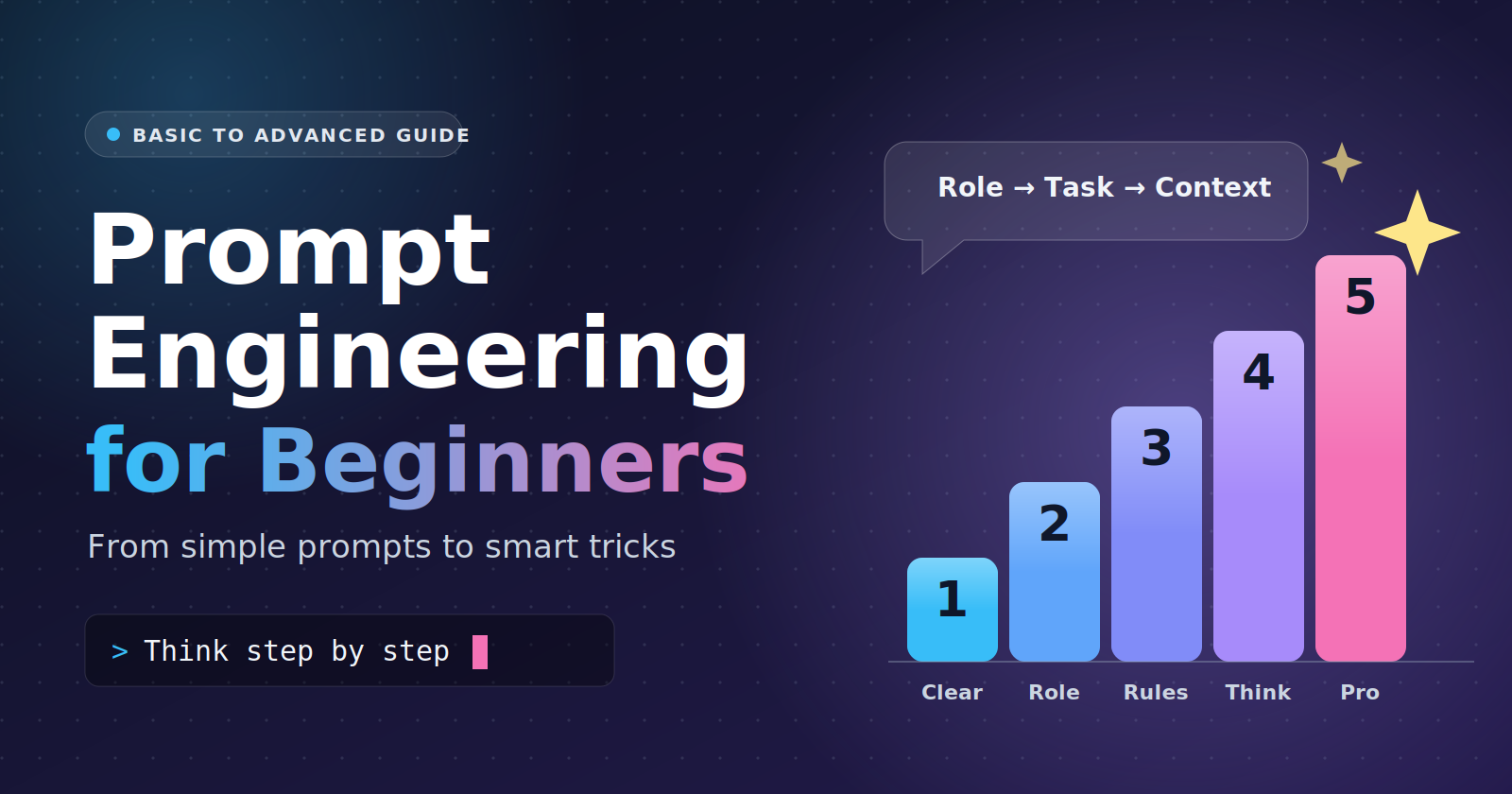
This guide has 5 levels. Start at Level 1 and climb up.
Level 1: Be clear
The first rule is simple: say exactly what you want.
Weak prompt:
Write about dogs.
Better prompt:
Write 5 fun facts about dogs for a 10-year-old. Keep each fact to one sentence.
See the difference? The second prompt tells the AI what, who it is for, and how long.
Tip: If a friend would ask “what do you mean?”, the AI is confused too.
Level 2: Role → Task → Context
This is the most useful formula for beginners. It has three parts:
Role: Who should the AI be?
Task: What should it do?
Context: What does it need to know?
Example:
You are a friendly math teacher. (Role) Explain fractions. (Task) My student is 9 years old and loves pizza. (Context)
The AI will now explain fractions with pizza slices, in simple words. Nice!
Why does it work? The role sets the voice. The task sets the goal. The context sets the details.
Level 3: Add rules and feelings
Now let’s make the answer safer and more careful.
Constraint modeling (the “threat” method)
A constraint is a rule. You tell the AI what it must do and what it must not do.
Summarize this article in 3 bullet points. Do not use words longer than 8 letters. If you are not sure about a fact, say “I don’t know.” Do not guess.
Some people make rules sound strict, like this:
If your answer has more than 50 words, it is wrong.
This works because the AI treats it as a strong rule. You do not need to be mean or scary. A firm, clear rule is enough.
Emotional plea
You can also tell the AI why the task matters to you.
This is very important. I have a job interview tomorrow. Please check my answer carefully.
Sometimes this makes the AI more careful and polite.
Honest note: The AI has no real feelings. These tricks do not always work, and they are not magic. Clear rules and good context work better. Use emotion as a small extra, not as your main tool.
Level 4: Make the AI think (Chain of Thought)
AI can make mistakes when it rushes. The fix is to ask it to think step by step. This is called Chain of Thought.
Zero-shot: no examples
Just add one magic line.
A shop sells 3 pens for $2. How much do 12 pens cost? Think step by step.
The AI will show its steps: 12 ÷ 3 = 4 groups, 4 × $2 = $8.
“Zero-shot” means you gave zero examples.
Few-shot: show examples first
Here you teach the AI by showing it a pattern.
Tell me if each review is Positive or Negative.
Review: “I loved this movie!” → Positive Review: “What a waste of time.” → Negative Review: “The food was amazing.” →
The AI will answer: Positive.
“Few-shot” means you gave a few examples (usually 2 to 5).
Tip: Keep your examples in the same format. The AI copies the pattern.
Level 5: Pro techniques
You now know the basics. Let’s learn the tricks that experts use.
1. Style mirroring
Want the AI to write like you? Show it your writing first.
Here are two emails I wrote: [paste email 1] [paste email 2]
Now write a new email asking my boss for a day off. Copy my tone, my sentence length, and my way of greeting.
The AI copies your style, so the result sounds like you, not like a robot.
2. Format fixer (get clean JSON)
Sometimes you need the answer in a fixed shape, for example when a program will read it. Tell the AI the exact format.
Read this text: “Sara is 25 and lives in Dhaka.” Return ONLY valid JSON with these keys: name, age, city. No extra words.
The AI answers:
{"name": "Sara", "age": 25, "city": "Dhaka"}
Tip: Say “ONLY” and “no extra words.” Also show the exact shape you want.
3. Chain of Thought + Few-Shot
This one joins Level 4’s two ideas. You show examples and show the steps inside each example.
Q: Tom has 5 apples. He buys 2 bags with 3 apples each. How many apples now? A: Bags give 2 × 3 = 6 apples. Then 5 + 6 = 11. Answer: 11
Q: Mia has 10 candies. She gives away 4 and then gets 3 packs with 2 candies each. How many now? A:
The AI copies your step-by-step style and solves it: 10 − 4 = 6, then 3 × 2 = 6, then 6 + 6 = 12. Answer: 12
This is great for tricky logic and math.
4. Meta prompting: let AI help write the prompt
Meta prompting means using the AI to make your prompts better. It is like asking a cook to write the recipe.
a) Prompt translator for images
Image tools like prompts that are rich and detailed. You can ask the AI to turn your simple idea into one.
Turn this idea into a detailed prompt for an AI image generator: “a cat in space.” Include the style, lighting, colors, and camera angle.
The AI might give you:
A fluffy orange cat floating in space, wearing a tiny astronaut helmet, glowing planets behind it, soft blue light, cinematic style, close-up shot, ultra detailed.
Now you paste that into your image tool.
b) The interviewer mode
Do not know what to write? Let the AI ask you questions first.
I want to write a speech for my sister’s wedding. Before you write anything, ask me one question at a time until you have enough details. Then write the speech.
The AI will ask: “What is your sister’s name? What is a funny memory you share?” After a few answers, it writes a speech full of real details.
c) Reverse engineering
Found a great answer, article, or image? Ask the AI to find the prompt that could have made it.
Here is a text I love: [paste text] Write the prompt that could have created this text. Include the role, tone, length, and format.
Now you have a reusable prompt. Change a few words and use it again for your own topic.
Bonus: One template for any prompt
You do not need a new prompt style every time. One flexible template covers most cases. Fill in the parts you need and skip the rest.
ROLE:
You are [who the AI should act as].

TASK:
[What you want done, in one clear sentence.]

CONTEXT:
[Who it is for, the background, the goal.]

INPUT:
[The text, data, or idea the AI should work on.]

RULES:
- [Length, tone, words to avoid]
- If you are not sure, say “I don’t know.”

EXAMPLES (optional):
Input: [example 1] -> Output: [example 1]
Input: [example 2] -> Output: [example 2]

THINK FIRST (optional):
Think step by step before you answer.

OUTPUT FORMAT:
[Bullets / table / JSON with keys a, b, c / 3 short paragraphs]
Which parts should you use?
| Part | Use it when |
|---|---|
| Role + Task + Context | Almost always |
| Rules | You want tight, safe answers |
| Examples | You want a fixed pattern or style (few-shot, style mirroring) |
| Think first | The task needs logic or math (Chain of Thought) |
| Output format | A person or a program needs a clean shape (format fixer) |
Example: the template filled in
ROLE:
You are a friendly science teacher.

TASK:
Explain why the sky is blue.

CONTEXT:
My student is 8 years old.

RULES:
- Use no more than 80 words.
- Use one simple comparison.

OUTPUT FORMAT:
One short paragraph.
Let the AI fill the template for you
Do not want to write it by yourself? Use Interviewer Mode.
I want to [your goal]. Ask me one question at a time to fill in
this template: role, task, context, rules, and output format.
When you have enough, write the final prompt for me.
Tip: Start small. Use only Role, Task, and Context. If the answer is not good enough, add one more part, like rules or examples. This works better than writing a huge prompt on the first try.
Quick cheat sheet
| Level | Technique | Use it when |
|---|---|---|
| 1 | Be clear | Always |
| 2 | Role → Task → Context | You want focused answers |
| 3 | Constraints and emotional plea | You want safer, tighter answers |
| 4 | Chain of Thought (zero-shot, few-shot) | The task needs thinking |
| 5 | Style mirroring | You want your own voice |
| 5 | Format fixer | A program must read the answer |
| 5 | CoT + Few-Shot | Hard logic or math |
| 5 | Meta prompting | You are stuck or want better prompts |
Final tips
Start simple, then add details.
If the answer is bad, change your prompt, not just your hopes.
Test the same prompt a few times. Small changes can give big results.
Save your best prompts. They are your toolbox.
Prompt engineering is not hard. It is just clear talking. Keep practicing, and you will get better every day.
Happy prompting!
Comments
Join the discussionNo comments yet. Be the first to comment.